Best Privacy-First Nutrition Tracker 2026 (Data, Ads)
 ChatGPT
  Claude
  AI Mode
  Perplexity
TL;DR - Best Privacy-First Nutrition Trackers 2026
• Clearest written commitments: MacroFactor. No sale, no cross-behavioral ad sharing, in-app export and in-app deletion. About $71.99 a year, no free tier.
• No account required: Foodnoms. You can log food without registering at all. Apple devices only.
• Nothing leaves the device: Waistline. Open source, offline, GPLv3, on F-Droid. Android only, and you own your backups.
• Ad-free on every tier: MyNetDiary. Plain promise, thin documentation. About $59.99 a year for Premium.
• Best data, worst free tier: Cronometer. Excellent nutrients, but the free plan sits inside an ad arrangement its own policy describes. Gold at $59.99 a year removes it.
• The honest note: NutriScan is not in this ranking, and the section below explains why we cannot be.
Researchers analyzed 20,991 mobile health apps and found that 88% of them contained code capable of accessing and potentially sharing personal user data, while only about half complied with the privacy policies they had published themselves (Tangari et al., 2021, The BMJ). The distance between what an app says and what an app does is the entire subject of this article.
NutriScan publishes this post, and we make a competing app. A food diary is one of the most detailed health records most people ever create voluntarily. It holds your weight, your goals, your medical conditions, your eating times, sometimes photos of your kitchen and your children's plates. In most countries none of that sits under medical privacy law, because you are not a patient. You are a customer.
This guide ranks five nutrition trackers on three things you can verify yourself: what the business model needs from you, what actually leaves your phone, and whether you can take your data and go. Every claim below is quoted from a first-party policy page you can open in another tab. Prices were checked in August 2026 and change by country.
IMPORTANT
Your privacy check plan at a glance.
A quick roadmap so you can decide before you install anything.
⏱️ Progress 0/4 • ~0 minutes in • Keep going
⏳ Step 1: What privacy-first has to mean in a food app
⏳ Step 2: The business model test, in their own words
⏳ Step 3: All 5 apps, ranked and priced
🔍 The 20-minute audit that beats every ranking, including this one (revealed near the end)
What "Privacy-First" Has to Mean in a Food App 🔒
Most articles on this topic rank apps by how pleasant the privacy page sounds. That is not evidence. This guide uses three tests instead.
Job 1: what does the business model need from you? An app that is free and shows ads has a commercial reason to know who you are, where you are, and what you might buy. An app that charges a subscription and shows no ads does not. This single fact predicts more about data practices than any privacy statement.
Job 2: what actually leaves your phone? Local-only storage, cloud sync, third-party analytics, advertising software kits inside the app. Each is a different level of exposure, and all of them are invisible from a marketing page.
Job 3: can you take it and leave? A privacy promise that lasts only while you keep paying is a weak promise. Real portability means an export you can open (five apps are scored on exactly that in which nutrition apps let you export and leave), and a delete path that works without an email negotiation.
Tracking is not neutral for everyone
A 2025 systematic review of diet and fitness monitoring apps found qualitative evidence of unintended consequences, including pressure to meet goals and guilt (Body Image, 2025). If tracking is making your relationship with food worse, the most private option is no app at all.
The Business Model Test, In Their Own Words 💰
Read four of these policies side by side and the differences stop being subtle.
MacroFactor states the reason plainly: "We do not sell your Personal Data to third parties" and "Unlike many other apps, we do not share your data for cross-behavioral advertising purposes. We are a premium app, and we do not need to engage in such practices" (MacroFactor Privacy Notice, updated December 2025). That second sentence is an admission about the whole category, and it is accurate.
MyFitnessPal, free with ads on its lower tier, discloses the opposite arrangement: "We also share your information with marketing and advertising partners to show you relevant content and advertising." It adds that certain cookie uses on its website "may constitute 'sales' or 'sharing' of personal information or the use of personal information for 'targeted advertising' purposes under applicable privacy laws" (MyFitnessPal Privacy Policy). The recipient categories listed include business partners, service providers, other users, analytics providers and research partners.
 The sharing section is four paragraphs long in most of these documents. It is also the only part that changes your answer.
Cronometer is the surprise, and the reason ranked lists on this topic deserve suspicion. Its policy protects health information specifically: "We do not sell PHI, or provide it to third parties without your consent." The same document also says the company may share personal information "to our advertisers to serve targeted advertisements to you on the Site," and is explicit about the free tier: "For users accessing our free Services, we disclose certain limited information to Service Providers that are network advertisers, sponsors, and/or traffic measurement services" (Cronometer Privacy Policy). Cronometer is an excellent nutrient tracker. On the free plan, it is also an ad-supported one.
MyNetDiary takes a third position, offering a free tier with no ads at all: "There are no advertisements in the free tier" (MyNetDiary, About). Its policy then limits what your health data can be used for: "This data is used solely to provide MyNetDiary features: food and exercise logging, calorie balance tracking, and health monitoring. It is not used for advertising" (MyNetDiary Privacy Policy).
IMPORTANT
Checkpoint: here's where you are right now.
Quick status update so you always know the next best move.
⏱️ Progress 1/4 • ~2 minutes in • Keep going
✅ Step 1: What privacy-first has to mean (done)
👉 Step 2: The business model test (you're here)
⏳ Step 3: All 5 apps, ranked and priced
🧩 The 20-minute audit that beats every ranking (coming soon)
Why the Store Privacy Label Is Not Enough 🏷️
Check the App Store privacy card or the Google Play Data safety section before you install. Then keep going.
Mozilla compared the Data safety labels of top Google Play apps against those same apps' privacy policies and found the labels false or misleading in nearly 80% of the apps reviewed (Mozilla Foundation, 2023). The labels are self-reported, and nobody audits them before publication.
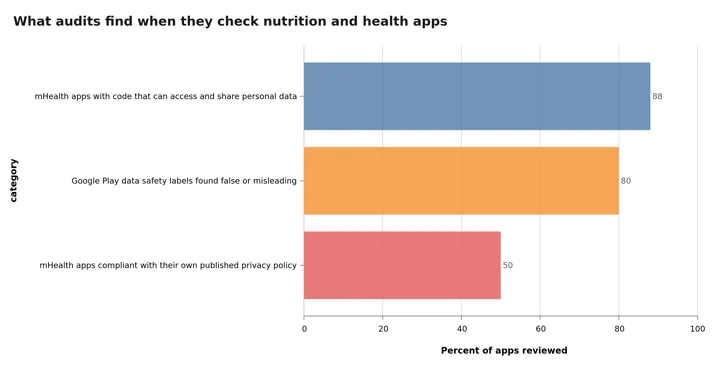 Figure 1: Three findings from independent audits of health apps and store labels. Read the third bar next to the first: most apps can share your data, and only about half follow the document they wrote about it.
The pattern repeats in neighboring categories. A 2025 qualitative content analysis of reproductive health app policies found the main concerns were IP address tracking and the involvement of third parties for advertising and marketing (content analysis, 2025). An analysis of mental health apps reached a similar conclusion, describing data privacy problems in apps used by millions of people who reasonably expect protection (Iwaya et al., 2022). These problems are structural rather than the fault of a few bad apps.
So treat the store label as a claim and the privacy policy as the contract. Where they disagree, the policy is the document a regulator will read.
How These Five Were Ranked 📋
Points for a subscription-only or ad-free model, for policy language that names specific practices instead of "we may share with partners," for local storage or a documented export, and for a deletion path inside the app. Points removed for advertising disclosures, vague recipient categories, and policies with no date on them.
Database size and logging speed are not part of this score. Our micronutrient tracking comparison covers accuracy instead, and if you want to set targets before you pick an app, the macro calculator does that without an account.
IMPORTANT
Checkpoint: midway progress update.
You're past the method. The ranking starts now.
⏱️ Progress 2/4 • ~4 minutes in • Keep going
✅ Step 1: What privacy-first has to mean (done)
✅ Step 2: The business model test (done)
👉 Step 3: All 5 apps, ranked and priced (current)
🧩 The 20-minute audit that beats every ranking (next)
1. MacroFactor: The Clearest Policy in the Category 🥇
MacroFactor wins because it is the only mainstream tracker whose privacy notice reads like it was written by someone who expected to be held to it.
The commitments are specific. No sale of personal data. No sharing for cross-behavioral advertising. Both the export and the deletion are self-service inside the app: "You can also request a copy of your data through the app. To do this, visit More, Data Management and select 'Data Export'" and "You have the right to request the deletion of your personal data. Simply go to More, Data Management and select 'Account and Data Deletion'" (MacroFactor Privacy Notice). The policy also carries a visible update date of December 2025, which sounds trivial until you try to date the other policies in this article.
The caveats are real. There is no free tier, so privacy here costs about $71.99 per year, covered in our MacroFactor value review. Your data sits on the company's servers rather than only on your phone. And the same notice discloses that the company uses Google for analytics, so this is a no-advertising app rather than a no-third-party app. If your standard is that nothing may leave the device, skip to number three.
Choose MacroFactor if you want a serious tracker, will pay for it, and want the documentation to be unambiguous.
2. Foodnoms: No Account Required, Nothing Sold 🍎
Foodnoms is the iPhone answer, and it clears a bar no other commercial app here clears: you can use it without creating an account. The account is optional, described in the policy as conditional: "If you want to create an account, as part of the account registration process, we will collect your name, email address and password" (Foodnoms Privacy Policy).
On sharing, the policy is one sentence with no exceptions attached: "We do not share, sell or rent to third parties your information except as described in this Privacy Policy." Website measurement runs on Plausible Analytics, and the policy notes that "all the site measurement is carried out anonymously. Cookies are not used and no personal data is collected." The product page states directly that "Your personal data is never shared with advertisers or sold to data brokers," and the app supports CSV export and Apple Health (Foodnoms).
The limits are platform and scope. It runs on iPhone, iPad, Mac and Apple Watch only, and it is a straightforward food logger with no coaching, photo estimation or voice assistant. Check the App Store listing for current subscription pricing, because the tiers change.
Choose Foodnoms if you are on Apple hardware and want to log food without handing over an identity. The Foodnoms pricing guide covers what stays free and what Foodnoms+ costs.
3. Waistline: Your Data Never Leaves the Phone 📴
If your honest answer is "I do not want a company involved at all," the answer is an open-source app from F-Droid, and Waistline is the mature one.
It is licensed under GPLv3, works offline, stores your diary on the device, includes barcode scanning, and has export and backup built in, with releases still shipping in March 2026 (Waistline on F-Droid). The F-Droid listing carries no tracking anti-features, and every build is compiled from published source, which is a stronger guarantee than any policy sentence in this article. It draws on Open Food Facts and contributes data back, which is why that project lists it among privacy-focused trackers alongside Privacy Friendly Food Tracker from the SECUSO research group and Food You (Open Food Facts wiki).
The trade is effort. No cloud sync, no coach, no AI estimate for a mixed bowl of food, a community database with real gaps outside Europe, and you own your backups because nobody else holds a copy.
The backup rule for local-only apps
On a device-only tracker, a lost phone is a lost diary. Set a monthly calendar reminder to run the in-app backup and move that file somewhere you actually control. Local storage removes the company from the risk list and puts you on it.
Choose Waistline if you are on Android and want zero accounts, zero servers and zero doubt.
4. MyNetDiary Premium: An Ad-Free Free Tier and a Plain Promise 🚫
MyNetDiary is the most conventional app here and still ranks fourth, because it does the two things that matter and does not complicate them.
There are no ads, including on the free tier (MyNetDiary, About). The policy limits the purpose of your health data in one line: "This data is used solely to provide MyNetDiary features: food and exercise logging, calorie balance tracking, and health monitoring. It is not used for advertising." On sharing it says "We do not otherwise share personally identifiable information with any third parties" (MyNetDiary Privacy Policy). Premium runs about $59.99 per year, and database rows are staff-verified rather than crowdsourced, which we compared in our no-ads tracking review.
It ranks below the first three on documentation rather than behavior: the policy page carries no visible last-updated date, it is thinner than MacroFactor's on analytics and international transfers, and deletion is described as an email request rather than a button. Those are process gaps, not evidence of selling.
Choose MyNetDiary if you want a normal, ad-free tracker with a short and readable promise.
5. Cronometer Gold: Excellent Data, Pay to Leave the Ad Path 🥗
Cronometer has the best nutrient data of any consumer tracker, covering up to 95 nutrients and compounds from laboratory-analyzed sources, and it offers CSV export. It is fifth for one reason: on the free plan you sit inside an advertising arrangement its own policy describes, where limited information goes to "network advertisers, sponsors, and/or traffic measurement services" (Cronometer Privacy Policy).
Gold removes the ads. Our Cronometer pricing breakdown puts that at $4.99 per month billed annually, charged as $59.99 upfront, or $10.99 month to month (Cronometer Gold). On the positive side, the policy commits that health information is not sold, states that account details will not be shared for commercial purposes without express permission, describes cloud storage on servers in the United States, and gives you a right to request a copy of the personal information collected in the previous 12 months.
Choose Cronometer Gold if you want laboratory-grade nutrient detail and are willing to pay so the free-tier ad path does not apply to you.
The Five Compared 📊
| App | Business model | Ads | What the policy says about selling | Export | Platform |
|---|---|---|---|---|---|
| MacroFactor | Subscription only, about $71.99/yr | None | Does not sell, no cross-behavioral ad sharing | In-app data export | iOS, Android |
| Foodnoms | Free plus subscription | None | Never shared with advertisers or sold to brokers | CSV and Apple Health | Apple only |
| Waistline | Free, open source | None | No company involved, data stays local | Local export and backup | Android |
| MyNetDiary | Freemium, about $59.99/yr | None on any tier | Not used for advertising, not shared | Reports, email request for some data | iOS, Android, web |
| Cronometer | Freemium, $59.99/yr Gold | Yes on free tier | Health data not sold, free tier shares limited data with ad networks | CSV | iOS, Android, web |
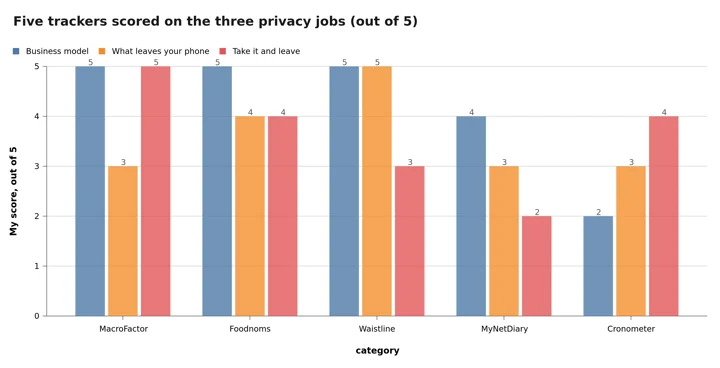 Figure 2: Our own scoring of the five against the three jobs, not an independent rating. Waistline wins the middle column outright and loses the third one, because nobody is holding a copy for you.
Where NutriScan Fits (It Is Not in This Ranking) 📸
NutriScan does not belong on this list. Writing that is easier than defending a place it has not earned.
The reason is architectural. NutriScan estimates nutrition from a photo of your meal and answers questions through Monika, a voice assistant. Both features send your photo or your speech to cloud AI services for processing. An app built that way can never compete with Waistline, where nothing leaves the device, and it will always have more third parties in the chain than a plain manual logger. If your requirement is that no company sees your food, install one of the five above.
What we do instead is publish the specifics in our privacy policy: personal data is not sold; product analytics run on PostHog hosted in the EU; health data is encrypted with TLS 1.3 in transit and AES-256 at rest; voice audio is deleted within 24 hours after transcription, with transcripts kept up to 30 days for conversation context; precise location, which is used only for the India mobile sign-in requirement, is deleted immediately after use; and meal photos are kept until you delete them or close your account, plus 90 days in secure backups.
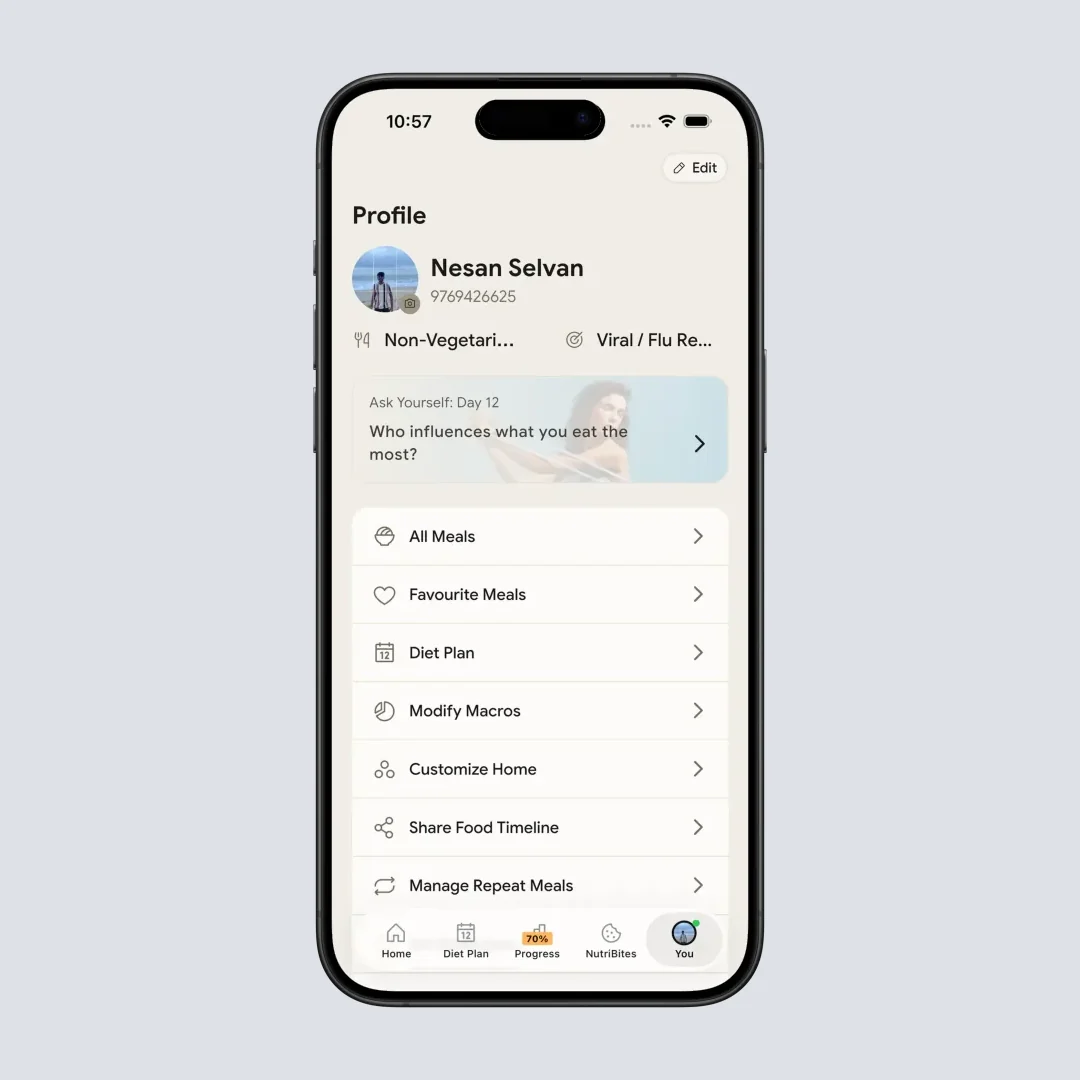
Home > Bottom Nav Profile. Share Food Timeline and Manage Account both live on this one screen, which is deliberate: the control that publishes your data and the control that deletes it should not be hard to find.
Our third-party list is long and it is named: Supabase for database and storage, Firebase, RevenueCat for subscriptions, the App Store and Play Store for payments, Authkey.io for India sign-in codes, Cloudflare for referral link redirects, PostHog for analytics, Netlify for this website, and selected LLM providers for meal and voice analysis. On that last one the policy commits that we minimize the personal data sent and do not permit training on your personal data. By the audit test below, a long named list beats a short vague one, and you should hold every app on this page to the same standard.
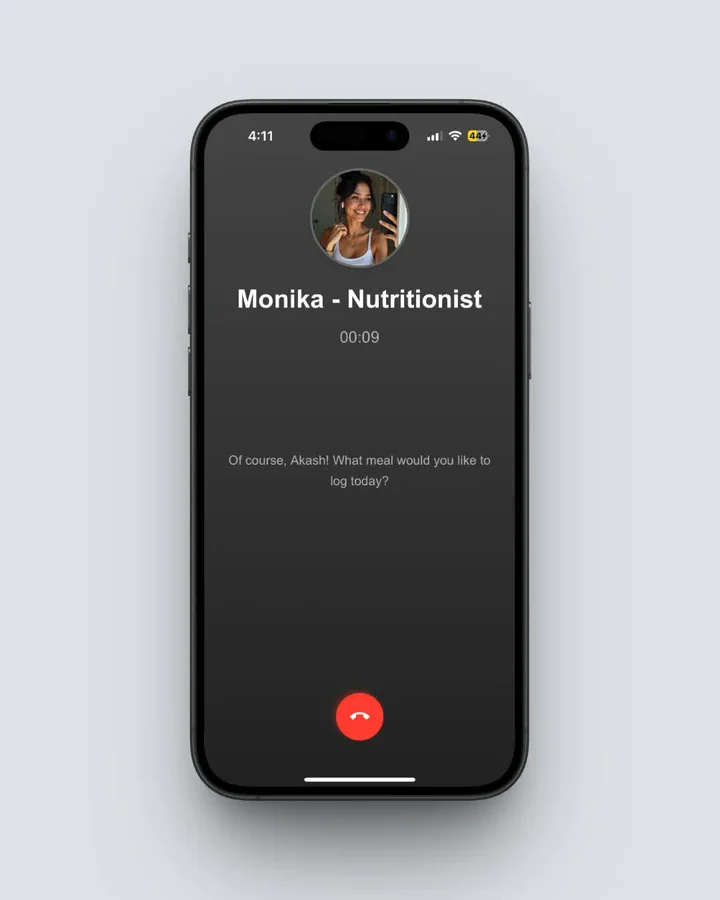 Home > Click Call Button. Free accounts get 4 Monika calls a week. Every one of those calls produces audio that is deleted inside 24 hours, and a transcript that is not, which is the trade a voice feature makes.
Three things you should know before choosing us:
Sign-in is Google, Apple, or an India-only mobile number. There is no email and password option today. On Apple hardware, Sign in with Apple plus Hide My Email is the least revealing route.
Public sharing is optional and permanent once used. Share Food Timeline creates a link anyone can open. Fasting data is excluded from that share and vacation days appear as gaps, but anything already shared publicly cannot be fully anonymized afterwards.
The in-app export is partial. Today the only one-tap export is fasting data as CSV. Your full history comes through a data portability request, which the policy says returns JSON with a CSV option covering meal history, nutrition data, profile and diet plans, delivered as a secure download link and taking up to 30 days for accounts with a lot of history. That is a real gap next to MacroFactor's in-app button, and it is on our list to close.
Pricing details are in our pricing guide, and if you want to see what the scanning side actually does before deciding, the meal scan guide walks through it.
What the Law Actually Protects, and What It Does Not ⚖️
Most people assume health privacy law covers their food diary. In the United States it usually does not, because those rules apply to healthcare providers and their business associates rather than to a consumer app.
Consumer protection law applies instead, and enforcement is real. In February 2023 the Federal Trade Commission took its first action under the Health Breach Notification Rule against GoodRx, with a $1.5 million penalty, over unauthorized disclosures of personal health information to Facebook, Google and other companies (FTC, 2023). In May 2023 the ovulation app Premom became the second case, barred from sharing users' personal health data with third parties for advertising (FTC, 2023). The agency had warned the whole category in a September 2021 policy statement (FTC, 2021), then finalized amendments in April 2024 clarifying that the rule applies to health apps and expanding what companies must tell you after a breach (FTC, 2024).
If you are in the EU or the UK, GDPR gives you stronger tools: access, correction, portability and erasure, plus a requirement of explicit consent for health data. In California you can request the categories of personal information collected and opt out of sale or sharing. These rights only work if you use them, which is the point of the audit coming up.

7 Ways to Tighten Any Nutrition App Today 💡
1. Pick the sign-in that reveals least. Signing in through a social network links your food diary to your advertising profile at that network. An email and password keeps those records apart. Where the app offers no email option, Sign in with Apple plus Hide My Email is the next best thing.
2. Refuse permissions the feature does not need. A food diary does not need your contacts, and it rarely needs precise location. Deny both. If a feature genuinely needs a permission later, the app will ask again.
3. Turn off personalized ads inside any free tracker. MyFitnessPal, for one, says users can decide whether to receive personalized ads or have information shared for that purpose. That setting usually sits in account privacy settings rather than the main menu.
4. Export your diary once a quarter. A CSV on your own computer means an app can shut down, change owners or raise its price without taking your history with it.
5. Keep photos out of the log when the food is not the subject. Meal photos can contain faces, documents and home interiors. If you only need calories, a text entry is a smaller disclosure.
6. Never make your log public to stay accountable. A public profile or a shared timeline link is permanently outside your control once someone indexes or saves it.
7. Delete the account, do not just delete the app. Removing the app from your phone leaves the server copy in place. Use the in-app deletion where it exists, and email the company where it does not.
 Deleting the app is throwing the paper in the bin. Deleting the account is the shredder, and only one of them removes the copy the company holds.
What the Research Supports 📚
Three findings shaped this ranking, and none of them are about calories.
First, exposure in this category is the default rather than the exception. In the analysis of 20,991 mobile health apps, most data collection operations were performed on behalf of a third party, and a large share of them were tied to a small number of dominant service providers, with Google most prominent (Tangari et al., 2021, full text).
Second, self-reported disclosures are weak evidence. Labels were false or misleading in nearly 80% of top Google Play apps reviewed (Mozilla Foundation, 2023), which is why the audit below asks you to compare two documents rather than trust one.
Third, the commercial pressure users complain about most is the same pressure that produces data collection. In a study of diet-tracking app reviews, an aggressive approach to advertising premium options and unclear policies on subscription charges and cancellations accounted for 15 of the top 50 negative themes (Zečević et al., 2021, JMIR). An app that needs your attention to sell you something will also want your data to target it.
IMPORTANT
Checkpoint: final stretch before the reveal.
One last nudge, the audit is next.
⏱️ Progress 3/4 • ~7 minutes in • Keep going
✅ Step 1: What privacy-first has to mean
✅ Step 2: The business model test
✅ Step 3: All 5 apps, ranked and priced
✨ The 20-minute audit that beats every ranking (about to reveal)
The 20-Minute Audit That Beats Every Ranking 🧩
Here is the part promised at the top. Every ranking on this subject, this one included, is a snapshot of documents that change. Policies get rewritten, companies get acquired, free tiers grow ad networks. The audit does not expire, and you can run it on your phone right now on an app nobody has reviewed.
Step 1: Read the sharing section and nothing else. Open the privacy policy and search for four words: sell, share, advertis, partners. Skip the rest. Those four searches tell you the commercial arrangement in about four minutes, which is faster than reading any review of the same app.
Step 2: Check for a last-updated date. A policy with no date has not been maintained against current law. Treat that as a signal about the company's process rather than proof of misuse. Of the five apps above, only MacroFactor made this step easy.
Step 3: Compare the policy against the store label. Open the App Store privacy card or the Google Play Data safety section for the same app and read it next to what you just found. Given that most labels were found to disagree with their own policies, any mismatch you find is your answer about which document to trust.
Step 4: Count the third parties by name. List every named company: analytics, crash reporting, payments, AI providers, advertising networks. Ten named companies is better information than three unnamed ones, because "our partners and affiliates" is a list that can grow without telling you.
Step 5: Find the export and use it today. Look for a data export in settings. If the only route is an email request, send it now and note how long the reply takes. That reply time is the real measure of your portability, and you want to learn it before you have three years of history in there.
Step 6: Find the delete button before you need it. Confirm you can delete your account from inside the app, then read what the policy says survives deletion, including backup retention windows. Almost every app keeps something for a period after deletion. The good ones tell you how long.
The audit, in six rows
| What you check | What a good answer looks like |
|---|---|
| The sharing section | Names specific practices, not "we may share with partners" |
| A last-updated date | Visible on the page, within the last 18 months |
| Policy against store label | They agree, or the policy is stricter than the label |
| Named third parties | A long named list, each with a stated purpose |
| Export route | A button in settings, not an email address |
| Delete route | In-app, with the backup retention window written down |
Why 20 minutes is enough
You are not reading for comprehension. You are checking six specific things, five of which are a text search away, and the sixth is a settings screen. The reason people skip this is not that it takes long. It is that nobody tells you which six things matter, so the document looks like 6,000 words of undifferentiated legal text.
Six rows. That table is the product, and it works on the app you are already using, which no ranked list can do.
IMPORTANT
Recap: everything you covered this round.
You finished the run, save this for the evening you install something.
⏱️ Progress 4/4 • ~9 minutes in • Nicely done
✅ Step 1: What privacy-first has to mean
✅ Step 2: The business model test
✅ Step 3: All 5 apps, ranked and priced
✅ The 20-minute audit: sharing section ➡️ check the date ➡️ policy against label ➡️ count named third parties ➡️ use the export ➡️ find the delete button (revealed)
Choosing One ✅
Want the clearest commitments and willing to pay: MacroFactor. On Apple hardware and want to log without an account: Foodnoms. Want nothing to leave your device: Waistline, with the extra effort that implies. Want a familiar app with no ads on any tier: MyNetDiary. Want nutrient depth: Cronometer with Gold, so the free-tier advertising disclosure does not apply to you.
Whichever you pick, run the 20-minute audit once. Read the sharing section, check the date, compare it with the store label, count the named third parties, use the export, and confirm the delete button exists. Those six actions protect you better than any ranking, including this one.
If photo logging and voice input are worth the extra third parties to you, you can try NutriScan, and you should hold us to exactly the same audit. Our NutriScore guide and insights guide explain what we do with the data once it is in there.
Frequently Asked Questions ❓
Which nutrition app sells the least data?
Among mainstream apps, MacroFactor makes the strongest documented commitments: no sale of personal data and no sharing for cross-behavioral advertising, both stated in its privacy notice. For an absolute answer, an open-source app like Waistline keeps your diary on your own device, so there is no company in the chain to sell anything.
Is my food diary protected by medical privacy laws?
Usually not. Those rules apply to healthcare providers and their business associates, not to a consumer app you download yourself. Consumer protection law applies instead. The FTC has enforced its Health Breach Notification Rule against health apps that disclosed health data without telling users, and its April 2024 amendments confirm the rule covers health apps.
Can I trust the App Store privacy label?
Treat it as a starting point. Mozilla found Google Play Data safety labels false or misleading in nearly 80% of the top apps it reviewed, because labels are self-reported and nobody audits them before publication. Compare the label against the privacy policy, and trust the policy where the two disagree.
Do free calorie counters sell my health data?
Not necessarily, but a free app funded by ads has a commercial reason to share something. Cronometer's policy states that health information is not sold, while also disclosing that free-tier users' limited information goes to network advertisers and traffic measurement services. MyFitnessPal says it shares information with marketing and advertising partners. MyNetDiary is the exception among free tiers, stating there are no ads on any tier and that your health data is not used for advertising.
How do I get my food diary out of an app?
Look for a data export in settings first. MacroFactor has one under More then Data Management, Foodnoms exports CSV and writes to Apple Health, Cronometer exports CSV, and Waistline backs up locally. If the only route is an email request, send it today and time the reply, because that reply time is your real portability. In the EU and UK, GDPR gives you a right to portability you can enforce.
Does NutriScan keep my meal photos private?
Our policy states that personal data is not sold, that health data is encrypted with TLS 1.3 in transit and AES-256 at rest, and that meal photos are kept until you delete them or close your account, plus 90 days in secure backups. Voice audio is deleted within 24 hours after transcription, with transcripts kept up to 30 days for conversation context. Two honest limits: photo and voice features send that content to cloud AI providers for processing, so we cannot match a local-only app, and the only one-tap in-app export today is fasting data as CSV.
This article is for general information and is not medical or legal advice. Prices and policy terms were checked in August 2026 and change by country and over time. If calorie tracking is affecting your relationship with food, speak with a qualified health professional.