NutriScan vs FatSecret: Which Nutrition Tracker Fits You?
 ChatGPT
  Claude
  AI Mode
  Perplexity
 FatSecret runs a large manual food database with a free ad-supported tier and dietitian-designed meal plans on Premium; NutriScan reads the meal from a photo, 5 AI scans a week free, and scores it with NutriScore. A photo takes about 30 seconds where FatSecret's search runs 3 to 5 minutes on a mixed plate. NutriScan Premium is about $59 a year and adds 28-day plans for diabetes, PCOS and pregnancy.
Last verified: August 23, 2026
| NutriScan | FatSecret | |
|---|---|---|
| Logging method | Photo scan, about 30 seconds a meal | Manual search, 3 to 5 minutes a meal |
| Free plan | 5 AI scans a week, full analysis, unlimited history | Free with ads |
| Nutrients shown | Macros plus micronutrients on both plans | Calories, protein, carbs, fat, fiber |
| Meal quality score | NutriScore on every meal | Not offered |
| Voice AI | Monika, 4 calls a week free | Not offered |
| Diet plans | 28-day plans for diabetes, PCOS, pregnancy | Premium, dietitian-designed templates |
| Premium price | about $59 a year | Monthly and annual options |
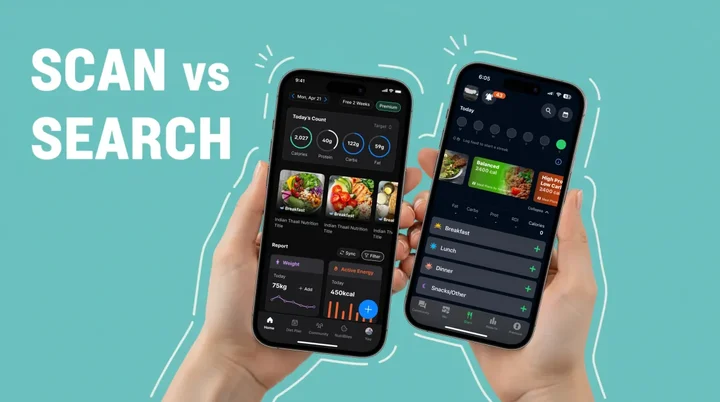
Have you ever stared at your plate wondering exactly how many calories you're about to eat? You're definitely not alone.
TL;DR - NutriScan vs FatSecret Quick Comparison
• NutriScan: AI photo scanning (30 seconds/meal), personalized diet plans, supports diabetes/PCOS/pregnancy, micronutrient tracking, NutriScore meal ratings
• FatSecret: Manual database search (3-5 min/meal), large food database since 2006, community features, basic calorie/macro tracking
• Best for speed: NutriScan - snap a photo vs typing each ingredient
• Best for homemade meals: NutriScan - AI recognizes mixed dishes; FatSecret requires recipe building
• Best for health conditions: NutriScan - built-in support for diabetes, PCOS, pregnancy goals
Research published in Obesity Science and Practice found that people who consistently track their food intake lose significantly more weight - with active app users achieving up to 5% body weight loss at 26 weeks (PubMed Study). But here's the catch - not all food tracking apps are created equal.
I've spent countless hours testing nutrition apps, and today I want to share my honest comparison between two popular choices: NutriScan App and FatSecret. Both promise to help you understand your food better, but they take very different approaches. By the end of this article, you'll know exactly which one fits your lifestyle, goals, and eating habits.
Why Does Your Choice of Nutrition App Matter? 🎯
Before I get into the comparison, let me tell you why picking the right app is so important. A systematic review published in the Journal of the Academy of Nutrition and Dietetics found that dietary mobile apps are effective self-monitoring tools that result in positive effects on nutritional outcomes, especially for weight management and chronic disease control (PubMed Research).
But the key word here is "effective" - and effectiveness depends heavily on whether the app matches your needs.
Think about it this way. If you hate manual data entry, an app that requires you to type every ingredient will quickly become frustrating. You'll stop using it within weeks. On the other hand, if you love detailed analytics but your app only shows basic calories, you'll feel underwhelmed. The right match between you and your app determines whether you'll stick with tracking long enough to see real results.
Understanding FatSecret: The Database Giant 📊
FatSecret has been around since 2006. That's nearly two decades in the nutrition tracking space, which is pretty impressive. The app built its reputation on having one of the largest food databases in the world.
What FatSecret Offers
Food Database: FatSecret claims to have millions of food entries. You can search for packaged foods, restaurant meals, and generic items. The barcode scanner works well for items with UPC codes.
Basic Tracking Features: You can log your weight, track macros like protein, carbs, and fat, and see your daily calorie intake displayed in pie charts.
Community Features: FatSecret includes social features where you can connect with others on similar journeys.
Recipe Database: The app includes recipes and meal ideas that other users have shared.
Premium Features: FatSecret Premium adds dietitian-designed meal plans for different diets like Keto, Mediterranean, and Intermittent Fasting. You also get water tracking and advanced meal planning.
The FatSecret Experience
Using FatSecret feels like working with a traditional calorie counter. You search for your food, select the right portion, and the app adds it to your daily log. It's straightforward but requires manual effort for every single item you eat.
The interface is functional but not particularly modern. Some users report that finding certain foods can be tedious, especially if they eat a lot of homemade or regional dishes.
Manual Logging Limitation
A University of Sydney study found that manual food-logging apps can overestimate energy intake for Western diets and underestimate for Asian diets (Nutrients Journal). This highlights a limitation that affects many database-driven apps like FatSecret.

Understanding NutriScan App: The AI-Powered Approach 🤖
 This is exactly what meal tracking looks like with NutriScan - snap, done!
NutriScan App takes a fundamentally different approach to nutrition tracking. Instead of making you search through databases, you simply take a picture of your meal. The AI analyzes your food and provides detailed nutritional information within seconds.
What NutriScan App Offers
AI Photo Recognition: Click a picture of any meal - homemade, restaurant, packaged food, supplements, or drinks - and get instant nutritional analysis with AI meal scanning. This eliminates the tedious search-and-log process that causes many people to abandon food tracking.

NutriScan's AI meal scanner: snap a photo and get instant nutrition breakdown (Home > Camera Icon > Crop Picture)
Complete Nutritional Breakdown: Beyond just calories and macros, NutriScan shows you micronutrients. You'll see fiber, potassium, calcium, omega-3, and more.
NutriScore System: Each meal gets a score that helps you understand its overall nutritional quality at a glance.
Personalized Diet Plans: NutriScan creates customized diet plans based on your specific goals - whether that's 🏃 weight loss, 💪 muscle gain, 💊 diabetes management, 🙆♀️🌸 PCOS, or 🤰 pregnancy nutrition.
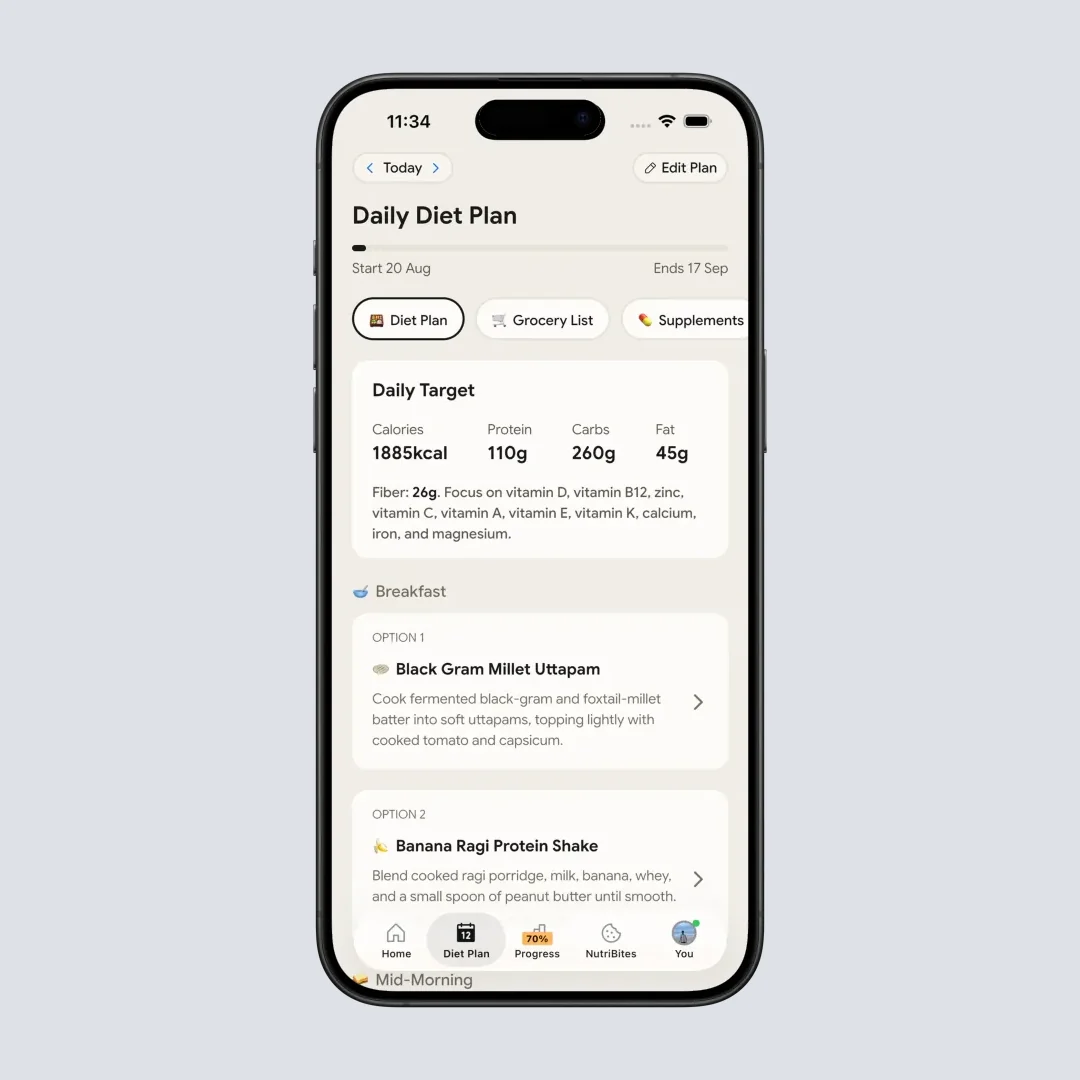
Personalized diet plan with meals tailored to your health goals (Profile > Diet Plan)
NutriBites Feature: This is like having a conversation with your meal history. Ask questions about your eating patterns and get insights you might never have noticed on your own.
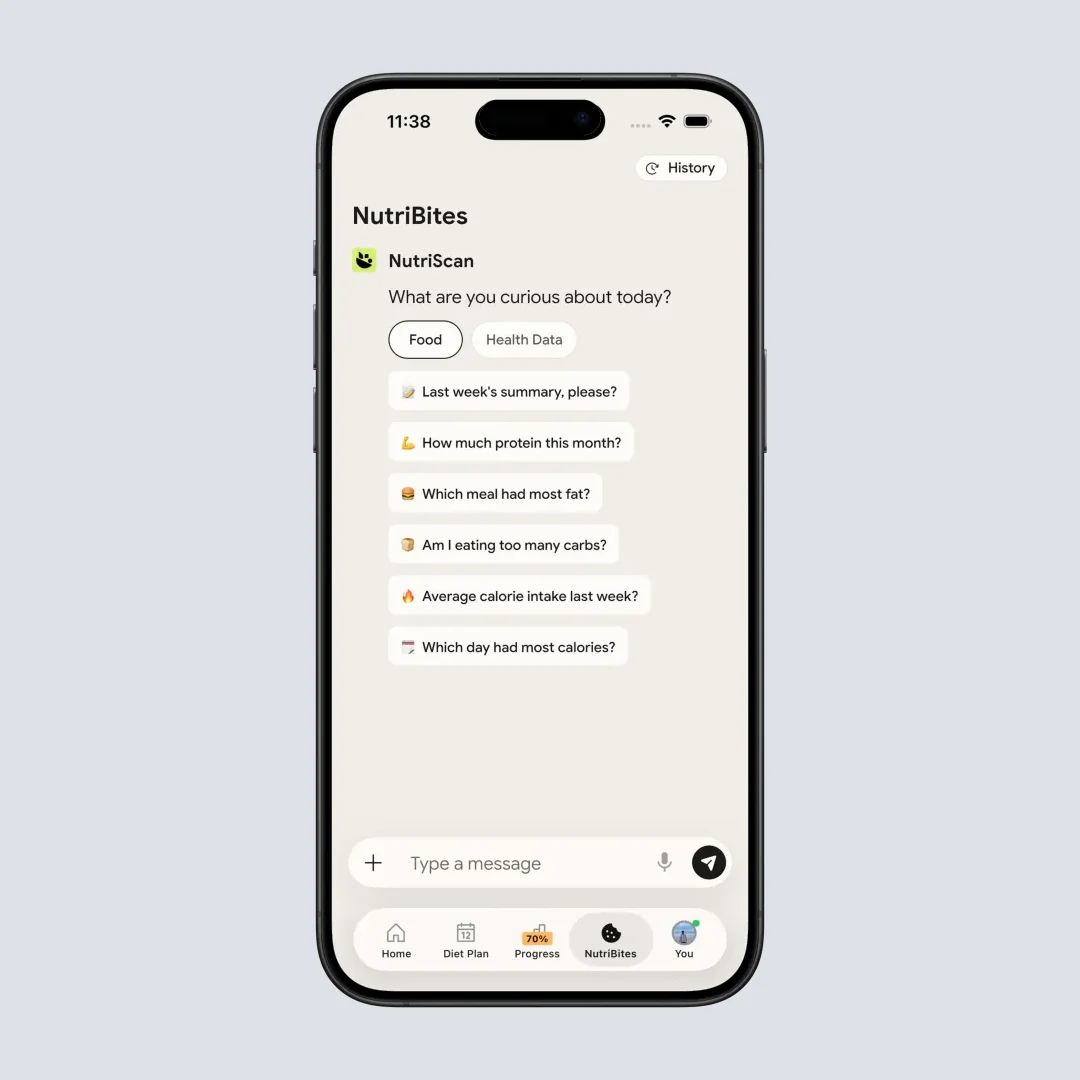
NutriBites: ask questions about your nutrition history and get AI-powered insights (Insights > NutriBites)
Voice-Powered AI Assistant: Talk to Monika, the in-app nutritionist, and ask any nutrition questions. You can even log meals through voice commands.
The NutriScan Experience
Using NutriScan feels more like having a personal nutritionist than using a traditional app. You don't need to remember portion sizes or scroll through endless food lists. Just snap, review, and learn.
The app recognizes that food logging burden is one of the main reasons people quit tracking. A study highlighted by the University of Sydney noted that AI food image recognition makes the tracking process much easier for everyone (University of Sydney Research).
Head-to-Head Comparison: 7 Key Areas 🏆
Let me compare these two apps across the factors that matter most for your daily tracking experience.
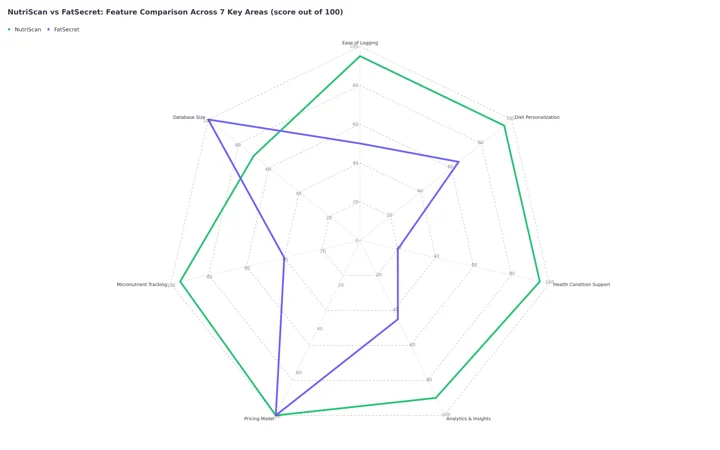 Figure 1: All 7 areas scored out of 100. NutriScan leads on logging speed, personalization, health condition support, analytics and micronutrients. FatSecret leads on database size. Pricing is a tie at 80, since both ship a free tier with a paid upgrade.
1. Ease of Food Logging
FatSecret: Requires manual searching and selection. You type the food name, browse results, choose the correct item, and adjust portion size. For a meal with multiple components, this process repeats for each item. Average time per meal: 3-5 minutes.
NutriScan: Take one photo. The AI identifies all food items in your meal simultaneously. Review and adjust if needed. Average time per meal: under 30 seconds.
Winner: NutriScan
When tracking feels quick and effortless, you're more likely to stay consistent. Research shows that higher app engagement correlates directly with better weight loss outcomes - active users lost up to 5.04% of body weight at 26 weeks compared to minimal loss for inactive users (Huntriss et al., 2024).
2. Accuracy of Nutritional Data
FatSecret: Relies on its database, which includes both verified entries and user-submitted data. Accuracy varies depending on the food item. Common packaged foods tend to be accurate, while homemade or regional dishes may have inconsistent entries.
NutriScan: Uses AI to analyze your actual meal and estimate nutritional content. You can adjust portion sizes and cooking methods (deep-fried, steamed, grilled) for better accuracy. The app also lets you specify oil levels used in cooking.
Winner: Depends on your diet. For packaged Western foods, FatSecret's database works well. For homemade meals, regional cuisines, or mixed dishes, NutriScan's visual AI approach often captures the meal more accurately.
3. Nutritional Detail
FatSecret: Shows calories, protein, carbohydrates, fat, and fiber. Premium adds some additional insights.
NutriScan: Displays full macro breakdown plus top micronutrients including potassium, calcium, omega-3, and more. The NutriScore gives you an instant quality assessment of each meal.
Winner: NutriScan
If you care about nutritional quality beyond just calorie counting, the micronutrient data and NutriScore provide a clearer picture of your overall diet health.
4. Diet Planning Support
FatSecret: Premium subscription includes pre-made meal plans designed by dietitians. Plans available for Keto, Mediterranean, Balanced, High Protein Low Carb, and Intermittent Fasting.
NutriScan: Creates fully personalized diet plans based on your individual profile. The app considers your health goal, food preferences (🌱 vegan, 🥗 vegetarian, eggitarian, non-veg), eating schedule, activity level, and even what ingredients you have in your kitchen.
Winner: NutriScan
Personalized nutrition that adapts to your specific situation outperforms generic meal plans. A randomized clinical trial published in Nature Medicine found that personalized dietary programs produced significantly better cardiometabolic health outcomes compared to standard dietary advice (Nature Medicine).
5. Health Condition Support
FatSecret: Primarily focused on weight management. No specific features for managing 💊 diabetes, 🙆♀️🌸 PCOS, or 🤰 pregnancy nutrition.
NutriScan: Built-in support for multiple health conditions including 💊 diabetes management, 🙆♀️🌸 PCOS, 🤰 pregnancy nutrition, and 🤒 viral recovery. Diet plans are specifically designed for each condition.
Winner: NutriScan
If you're managing a specific health condition, having an app designed with that in mind makes a real difference. Research shows that apps providing personalized plans to manage diabetes show beneficial effects on self-care behaviors (PMC Research).
6. Insights and Analytics
FatSecret: Basic reporting showing calories consumed and burned. Weight tracking with progress graphs. Premium adds more detailed macro tracking.
NutriScan: Multiple insight features including calendar view showing NutriScore colors by day, city map showing where you ate, weekly and monthly reports synced with health data. The NutriBites feature lets you ask questions about your meal history and discover patterns you might have missed.
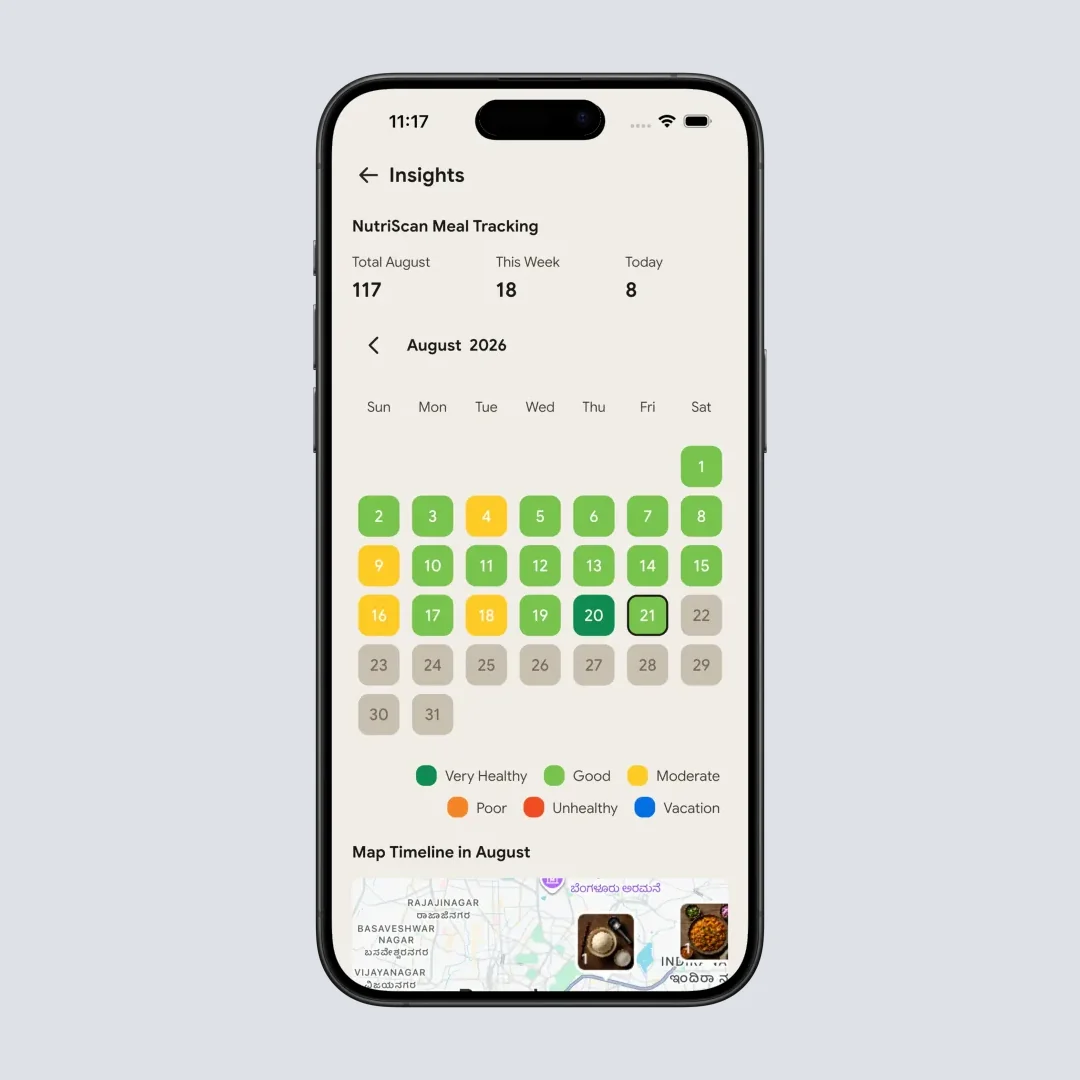
Visual calendar tracking: see your NutriScore pattern at a glance (Insights > Calendar)
Winner: NutriScan
The ability to ask questions about your eating patterns and get AI-powered answers takes analytics beyond simple charts and graphs.
7. Pricing Model
FatSecret: Free version with ads. Premium subscription ranges from monthly to annual options.
NutriScan: Free plan with 5 AI meal scans a week, full nutrition analysis and unlimited meal history. Premium Plan adds unlimited scanning, personalized diet planning, detailed recipes, and expert guidance. 7-day free trial available.
Winner: Tie. Both offer free versions with premium upgrades. Choose based on which features you actually need.
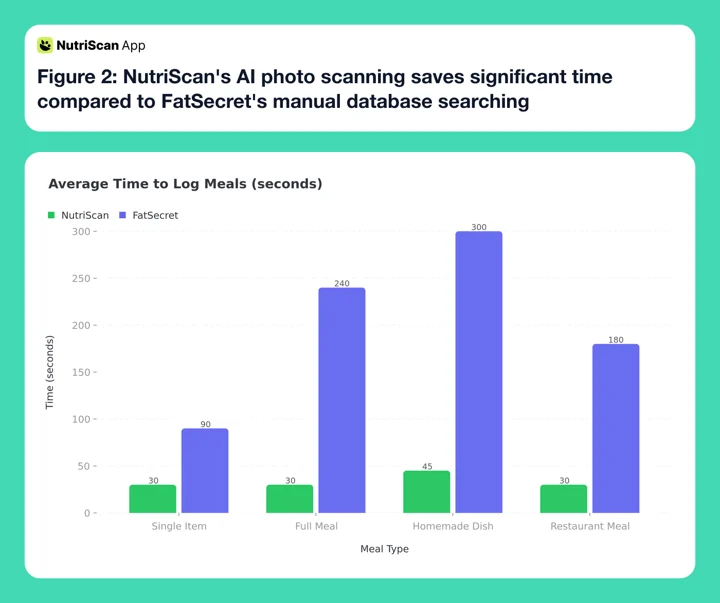 Figure 2: NutriScan's AI photo scanning saves significant time compared to FatSecret's manual database searching
Real-World Scenarios: Which App Works Better? 🌍
Let me paint some pictures of how these apps perform in everyday situations.
Scenario 1: Busy Professional
You grab lunch from a food court. Your plate has rice, some curry, a side salad, and a drink.
With FatSecret: You search "rice," guess the portion, search "curry," try to find something similar in the database, search "salad," and so on. Takes 5-7 minutes if you're thorough.
With NutriScan: You take one photo of your entire plate. The AI identifies each component. You review and adjust portion sizes if needed. Done in 30 seconds.
Scenario 2: Home Cook
You made dinner with fresh vegetables, some protein, and spices from your region.
With FatSecret: Homemade meals often aren't in the database. You either create a custom recipe (time-consuming) or search for similar items (less accurate).
With NutriScan: The AI analyzes what it sees on your plate. You can specify cooking methods like steamed, grilled, or stir-fried, and adjust oil levels for better accuracy.
Scenario 3: Managing Diabetes
You need to monitor your carb intake carefully and understand how meals affect your glucose levels.
With FatSecret: Shows carb counts. No specific diabetes management features or meal recommendations designed for blood sugar control.
With NutriScan: Provides carb information plus a personalized 💊 diabetes-focused diet plan. The app was built with diabetes management as one of its core use cases.
Scenario 4: Pregnancy Nutrition
You're expecting and want to ensure you're getting proper nutrition for yourself and your baby.
With FatSecret: No pregnancy-specific features or guidance. You'd need to research pregnancy nutrition separately.
With NutriScan: 🤰 Pregnancy is a specific goal option. Your diet plan is designed with pregnancy nutrition requirements in mind, showing you foods to eat and avoid during this period.
 When you finally find the app that fits your lifestyle
5 Tips for Getting the Most from Your Nutrition App 💡
Regardless of which app you choose, here's how to maximize your results:
Tip 1: Track Consistently, Not Perfectly
Studies show that consistent tracking - even if not 100% accurate - leads to better outcomes than sporadic perfect tracking. A PubMed study found that participants who tracked food most days achieved greater weight loss than those who tracked occasionally but precisely (Obesity Journal). Pick an app you'll actually use daily.
Tip 2: Review Your Data Weekly
Don't just log and forget. Spend 5 minutes each week reviewing your patterns. What days did you eat well? When did you struggle? This reflection helps you identify triggers and make adjustments.
Tip 3: Focus on Trends, Not Individual Meals
One high-calorie meal doesn't ruin your progress. Look at your weekly averages rather than obsessing over daily fluctuations. This mindset keeps you motivated for the long term.
Tip 4: Use the Educational Features
Both apps offer ways to learn about nutrition. FatSecret has community posts and recipes. NutriScan has NutriBites questions and an AI assistant. Engage with these features to build your nutrition knowledge over time.
Tip 5: Adjust Your Goals Periodically
Your body and needs change. What worked for 🏃 weight loss might need adjustment for maintenance. Review and update your goals every 4-8 weeks to stay aligned with your current situation.
Step-by-Step Guide: Switching from FatSecret to NutriScan 📱
If you're considering making the switch, here's how to transition smoothly:
Step 1: Download NutriScan App Get the app from the App Store or Play Store. The download is free and setup takes just a few minutes.
Step 2: Complete Your Profile Enter your details including height, weight, age, activity level, and health goals. This information helps NutriScan personalize your experience.
Step 3: Set Your Food Preferences Tell the app whether you're 🌱 vegetarian, 🌿 vegan, eggitarian, or non-vegetarian. This ensures your diet plans and suggestions match your eating style.
Step 4: Take Your First Meal Photo Don't overthink it. Just photograph your next meal and see the AI in action. Review the nutritional breakdown and get familiar with the interface.
Step 5: Explore the Features Try asking a question in NutriBites about your eating habits. Check out the NutriScore explanation to understand how meal quality is measured.
Step 6: Consider Premium for Diet Planning If you want personalized meal plans, start the 7-day free trial of the Premium Plan. See if the customized diet guidance fits your lifestyle before committing.

The 30-Second Test That Reveals Your Perfect App Match
Here's the simple decision framework that cuts through the noise:
Answer these 3 questions:
How do you typically eat?
- Mostly packaged foods with barcodes → FatSecret may work
- Homemade meals, regional cuisines, mixed dishes → NutriScan wins
How much time can you spend logging?
- 3-5 minutes per meal is fine → Either app works
- Under 1 minute or you'll quit → NutriScan is essential
Do you have specific health goals?
- Just basic calorie counting → Either app works
- 💊 Diabetes, 🙆♀️🌸 PCOS, 🤰 pregnancy, or personalized diet plans → NutriScan only
If you answered NutriScan for 2 or more questions, start there. The AI-powered approach removes the friction that causes most people to abandon tracking within weeks.
Research Findings: Why AI Food Tracking Is the Future 🔬
The nutrition tracking landscape is shifting toward AI-powered solutions. Here's why this matters:
A study published in the Journal of Medical Internet Research found that AI demonstrates significant advantages in improving accuracy and enabling real-time monitoring compared to traditional methods (JMIR Research).
Another research paper in Frontiers emphasized that apps incorporating machine learning for food recognition can achieve high accuracy rates - up to 93% in controlled conditions (Frontiers Study).
The key insight from a PMC review is that engagement with nutrition apps directly correlates with health outcomes. Apps that reduce the burden of logging see higher engagement, which translates to better results (PMC Mobile Health). This is exactly why NutriScan's photo-based approach has an advantage over manual entry systems.
My Final Verdict 📝
After comparing both apps across multiple dimensions, here's my honest conclusion:
Choose FatSecret if:
- You primarily eat packaged foods with barcodes
- You prefer a simple calorie counter without many features
- You don't need condition-specific diet guidance
- You enjoy community features and user-submitted recipes
Choose NutriScan App if:
- You want the fastest way to log meals (photo-based)
- You eat diverse foods including homemade and regional dishes
- You need personalized diet plans for specific health goals
- You're managing conditions like 💊 diabetes, 🙆♀️🌸 PCOS, or 🤰 pregnancy
- You want micronutrient insights beyond just macros
- You appreciate AI-powered insights about your eating patterns
For most people looking to truly understand their nutrition and build sustainable healthy habits, NutriScan's modern approach delivers more value. The photo-based logging removes the biggest barrier to consistent tracking, and the personalized diet planning provides guidance that generic databases simply cannot match.
If you're curious about how NutriScan compares to other popular apps, check out our detailed comparisons with MyFitnessPal, Cronometer, and Noom.
Frequently Asked Questions ❓
Q1: Can NutriScan recognize foods from my culture?
A: Yes, NutriScan's AI is trained to recognize diverse cuisines including Indian, Asian, Middle Eastern, and Western foods. The app also lets you add details and adjust cooking methods for better accuracy with regional dishes. The system improves over time as more users scan different types of meals.
Q2: Is NutriScan accurate for homemade meals?
A: NutriScan uses AI image recognition to analyze what's on your plate. You can adjust portion sizes and specify cooking methods like oil level and cooking style to improve accuracy. No app is 100% perfect, but the photo-based approach often captures homemade meals better than searching generic databases.
Q3: Does NutriScan work offline?
A: The meal scanning feature requires internet connection since the AI analysis happens on cloud servers. However, you can view your previously logged meals and reports offline. This lets you review your progress anytime, anywhere.
Q4: Can I use NutriScan if I'm pregnant?
A: Yes, 🤰 pregnancy nutrition is one of the specific health goals NutriScan supports. The Premium Plan diet guidance is customized for pregnancy requirements, showing foods to eat and avoid during each stage. Always consult with your healthcare provider alongside using any nutrition app.
Q5: How does NutriScore work in NutriScan?
A: NutriScore evaluates your meal's overall nutritional quality on a scale. The score considers factors like nutrient density, balance of macros, and presence of beneficial micronutrients. Higher scores indicate healthier meals. You can tap to learn more about what affects your score and how to improve it.
Ready to experience smarter nutrition tracking? Download NutriScan App today and see how easy food logging can be. Click your meal, discover what's in it, and get on track with your health goals.
