Is NutriScan App Better Than Fittr? Honest 2026 Comparison
 ChatGPT
  Claude
  AI Mode
  Perplexity
 Fittr keeps its calorie counter, workout tracker and calculators free, then sells coaching from Rs 8,000 to Rs 50,000 or more depending on the coach. NutriScan gives 5 AI meal scans a week free, with unlimited scanning and 28-day diet plans on Premium. Manual logging in Fittr runs about 25 to 30 minutes a day against roughly 2 minutes for photo scanning.
Last verified: August 23, 2026
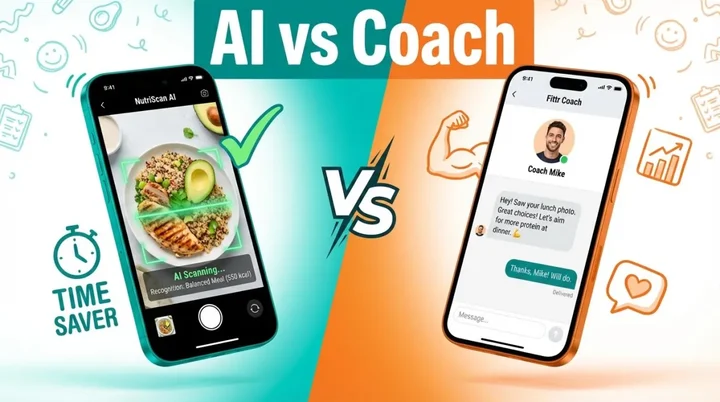
Have you ever wondered why 70% of people trying to lose weight give up within the first month?
TL;DR - NutriScan vs Fittr Comparison
• Core difference: NutriScan uses AI for instant meal scanning; Fittr focuses on human coaching with certified trainers
• Best for NutriScan: Busy professionals who want quick food logging (30 seconds vs 8-10 minutes), diverse regional cuisine tracking, affordable diet planning
• Best for Fittr: Users who need personal accountability, combined workout + nutrition coaching, community-based challenges
• Pricing gap: NutriScan Premium is significantly more affordable than Fittr coaching (₹8,000-₹50,000+)
• Health conditions: Both support PCOS, diabetes; NutriScan adds pregnancy and viral recovery goals
According to research published in the Journal of Medical Internet Research, the main reason people give up on weight loss is simple - tracking food manually is just too hard and time-consuming (JMIR, 2024).
I have been there myself. Spending 10-15 minutes logging every meal. Searching through huge food databases. Getting frustrated when my regional dishes are not there. And eventually, giving up because who has that kind of time every day?
This is exactly why I started exploring smarter nutrition apps. Two names kept coming up in my research - NutriScan and Fittr. Both are popular in India and growing globally. But which one is actually better for your health goals?
After weeks of testing both apps, talking to users, and diving deep into their features, I am ready to share my honest findings. Let me be clear upfront - I genuinely wanted to find out which app delivers better results for real people with real health goals.
What Makes These Apps Different?
Before jumping into the comparison, let me explain what each app actually does.
Fittr started in 2016 as a WhatsApp community by Jitendra Chouksey. It has grown into a major fitness platform with over 5.8 million downloads and 700+ certified coaches (AWS Case Study, 2025). The app focuses on personal coaching, workout programs, and community-based fitness challenges.
NutriScan is an AI-powered nutrition tracking app that uses image recognition technology. You simply take a picture of your meal, and the app instantly tells you the calories, protein, carbs, fats, and micronutrients. It also offers personalized 28-day diet plans based on your specific goals like 🏃 weight loss, 💪 muscle gain, 💊 diabetes management, 🙆♀️🌸 PCOS, or 🤰 pregnancy nutrition.
The core difference? Fittr is primarily a coaching platform where you pay for human trainers. NutriScan is an AI-first solution that gives you instant nutrition analysis without waiting for anyone.
 This is what manual food logging feels like after the third meal of the day
The Real Problem With Traditional Food Tracking
Here is something most people do not talk about - traditional dietary assessment methods have serious accuracy issues. A 2024 study in PubMed found that conventional food tracking methods like 24-hour dietary recalls and food diaries are often prone to recall error and social desirability bias (Zheng et al., 2024).
What does this mean for you? When you manually log your meals, you are likely:
- Underestimating portion sizes
- Forgetting snacks and small bites
- Not accounting for cooking oils and hidden calories
- Getting frustrated with incomplete food databases
Research from the University of Sydney showed that manual food logging apps underestimated energy intake for Asian diets by an average of 1520 kJ (Nutrients Journal, 2024). For Indian food lovers like us, this is a massive problem because our meals are often complex with multiple ingredients.

Feature-by-Feature Comparison
1. Meal Tracking Method
Fittr: Uses traditional manual logging. You search for foods in their database and enter quantities. They have improved their food library over time, but users still report that the interface could be better and faster.
NutriScan: Uses AI image recognition. You take a photo of your meal, select the food type (🏠 Home Made, 🧑🍳 Restaurant/Cafe, 🍫 Packaged Food, 📍 Street Food, 💊 Supplements, 🏨 Hotel/Event Buffet), choose the cooking method (🍟 Deep-fried, 🍃 Air-fried, 🫧 Steamed, etc.), and get instant nutrition breakdown. You can also add voice or text input if needed.
My Experience: The difference is night and day. With Fittr, I spent about 8-10 minutes logging a typical Indian thali with dal, rice, sabzi, and roti. With NutriScan, I clicked one photo and got results in under 30 seconds. For busy professionals, this time savings adds up quickly.
Time Savings Calculator
If you log 3 meals daily:
- Fittr manual logging: ~25-30 minutes/day ➡️ 15+ hours/month
- NutriScan AI scanning: ~2 minutes/day ➡️ 1 hour/month
That's 14 hours back in your month for other priorities.
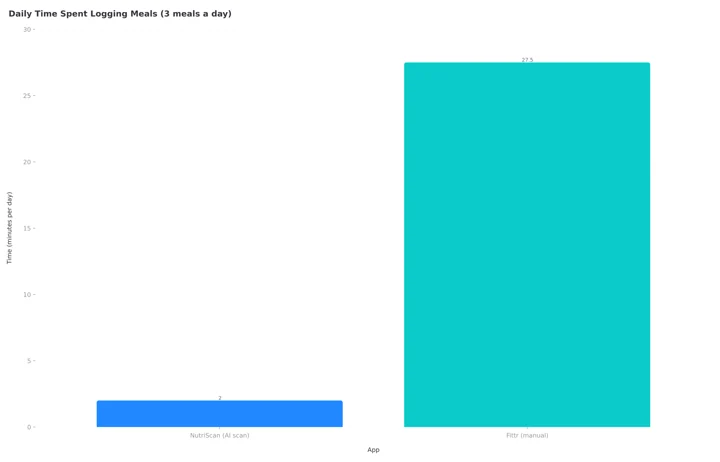 Figure 1: Daily time spent logging three meals. The Fittr bar plots 27.5 minutes, the midpoint of the 25 to 30 minutes quoted above, against about 2 minutes for NutriScan's AI scanning.
2. Regional Food Recognition
This is where things get interesting for people eating diverse cuisines.

Fittr: Has a decent database of Indian foods, but many regional dishes are missing or require manual entry with estimated values.
NutriScan: The AI is trained to recognize foods from multiple countries and cuisines. Whether you are eating South Indian dosa, North Indian paratha, Chinese stir-fry, or Middle Eastern falafel, the app can analyze it. You can specify if it is homemade, from a restaurant, street food, or hotel buffet - and the app adjusts the nutrition calculations accordingly.
3. Personalized Diet Plans
Fittr: Diet plans are created by human coaches. You get personalized meal plans based on your consultation with your assigned coach. The quality depends heavily on which coach you get and their expertise level. Coaches are certified through the Institute of Nutrition and Fitness Sciences (INFS).
NutriScan: Offers AI-generated 28-day diet plans based on your goals (🏃 weight loss, 💪 muscle gain, 💊 diabetes, 🙆♀️🌸 PCOS, 🤰 pregnancy, 🤒 viral recovery), food preferences (🌱 Vegan, 🥗 Vegetarian, Eggitarian, Non-Veg), eating schedule, and lifestyle. The plan includes specific meals for 🥣 Breakfast, 🍞 Mid-Morning, 🍱 Lunch, 🍏 Afternoon, 🍛 Dinner, and 🛏️ Bed Time. Each meal comes with portions, recipes, and easy swaps.
4. Health Condition Support
Fittr: Offers PCOS/PCOD and diabetes management programs. Their coaches create custom workout and nutrition plans for these conditions. They claim over 350,000 successful transformations.
NutriScan: Has specific goal-based tracking for 💊 diabetes, 🙆♀️🌸 PCOS, 🤰 pregnancy, and 🤒 viral/flu recovery. The app adjusts NutriScore colors and recommendations based on your selected health condition. For PCOS users, it focuses on tracking carbs and suggesting PCOS-friendly alternatives.
Research shows that mobile apps can be effective for managing chronic conditions. A 2024 study found that lifestyle interventions delivered through apps showed a 65% success rate in symptom improvement for conditions like PCOS and diabetes (Frontiers in Endocrinology, 2024).
5. Pricing Comparison
This is where the biggest difference appears.
| Feature | Fittr | NutriScan |
|---|---|---|
| Free tier | Calorie counter, workout tracker, calculators | 5 AI meal scans a week |
| Basic tracking | Included with coaching | Free, unlimited scanning on Premium |
| Personalized plans | ₹8,000 - ₹50,000+ (coach-dependent) | Premium Plan (28-day plans, recipes, guidance) |
| Hardware | FITTR HART ring ₹19,999 | None required |
| Money-back guarantee | 30 days | Free plan |
Fittr:
- Free tools: Calorie counter, workout tracker, BMR calculator, body fat calculator
- Coaching packages: Prices vary by coach tier (Basic, Standard, Premium, Advance, Advance+, Elite)
- Coaching can range from ₹8,000 to ₹50,000+ depending on coach level and program duration
NutriScan:
- Free: 5 AI meal scans a week, detailed nutrition analysis, unlimited meal history
- Premium Plan: Unlimited scanning plus personalized 28-day diet plans, detailed recipes, nutritional breakdowns
- Significantly more affordable than personal coaching options
6. Community Features
Fittr: Strong community focus with fitness challenges, Fitcoins rewards, social groups, and a competitive leaderboard. You can earn Fitcoins by completing challenges and use them to buy products from their Fitshop.
NutriScan: Has a community ranking feature where users are ranked based on their NutriScore and meal consistency. The ranking formula considers total meals logged, average NutriScore, and consistency bonus. Also has an Invite & Earn program where both referrer and referred user get 1 week of Premium Plan.
7. Insights and Analytics
Fittr: Provides biological age tracking, wellness insights, progress monitoring, and integration with Apple Health. Their HART ring tracks 50+ body metrics including sleep, HRV, stress, and activity.
NutriScan: Offers visual insights through a calendar view showing NutriScore colors (dark green, green, yellow, orange, red) for each day. Users can view city maps showing where they ate meals, weekly trends via Reports, and nutrition breakdowns over time. The app calculates overall NutriScore for the day using a weighted formula based on meal calories and individual NutriScore. Reports sync with Health Data and can be filtered by Day, Week, Month, or 3 Months.
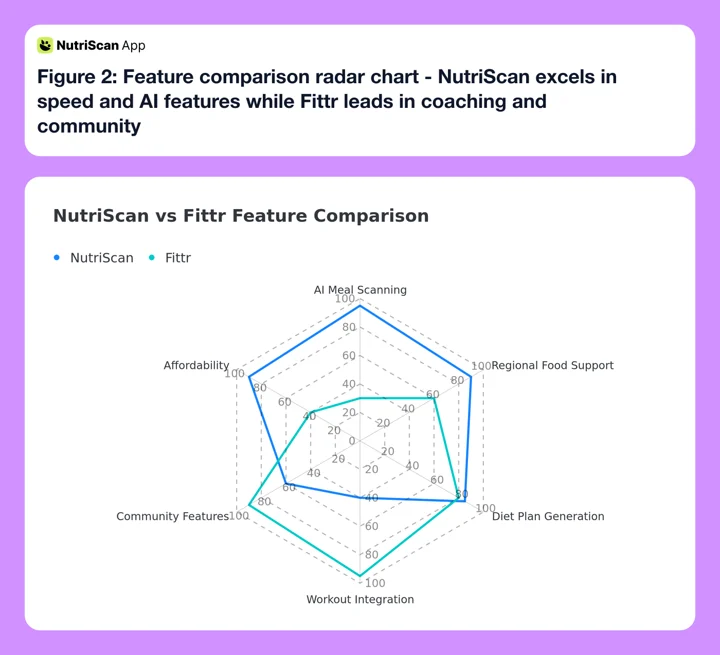 Figure 2: Feature comparison radar chart - NutriScan excels in speed and AI features while Fittr leads in coaching and community
Real Stories: What Users Are Saying
I spent time reading reviews and talking to users of both apps. Here is what I found:
Fittr Users Say:
- "The coach changed my life. I lost 25 kg in 6 months."
- "The community support keeps me motivated."
- "Sometimes the coach takes time to respond, but the guidance is solid."
- "The app interface could be faster."
NutriScan Users Say:
- "I love that I just click a photo and get everything instantly."
- "Finally an app that understands Indian food properly."
- "The PCOS tracking helped me understand which foods were causing bloating."
- "The diet plan feature saved me from hiring an expensive nutritionist."
For more insights on user experiences, check out our detailed NutriScan app reviews article.
 The moment when you finally see results from consistent tracking
7 Tips for Choosing the Right Nutrition App
Based on my research and the latest findings on mobile health applications, here are my recommendations:
1. Consider Your Time Availability
Studies show that consistent diet tracking leads to better weight loss outcomes - users who tracked regularly lost 42% of their body weight over 52 weeks (Obesity Science & Practice, 2024). If you have limited time, choose an app with faster logging methods like AI image recognition.
2. Think About Your Cuisine
If you eat diverse, regional foods that are not commonly found in Western databases, look for apps that specifically support your cuisine. This matters because underestimating calorie intake can derail your progress.
3. Evaluate Your Need for Human Coaching
Some people thrive with personal accountability from a human coach. Others prefer the convenience and privacy of AI-driven solutions. Research indicates both approaches can work - what matters is consistency (Journal of Medical Internet Research, 2022).
4. Check for Health Condition Support
If you have specific conditions like PCOS, diabetes, or pregnancy, make sure the app has specialized features for your situation. Generic calorie counting is not enough for managing these conditions. For PCOS-specific guidance, see our PCOS meal tracking guide.
5. Look at More Than Just Calorie Counting
The best nutrition apps track micronutrients too. Deficiencies in vitamins and minerals can affect your energy, mood, and overall health even if your calorie intake is perfect. Learn more about why nutrition tracking beats calorie counting.
6. Consider Long-term Sustainability
A 2024 meta-analysis found that weight loss through smartphone apps peaks at 2.18 kg at 3 months and tapers to 1.63 kg at 12 months (Journal of Medical Internet Research, 2022). Choose an app you can stick with long-term, not just for a quick fix.
7. Evaluate the Total Cost
Calculate the total yearly cost including subscriptions, coaching fees, and any additional purchases. Sometimes a more expensive upfront investment saves money compared to ongoing coaching fees.
Cost Reality Check
Before committing to any coaching program, calculate your 12-month cost:
- Fittr coaching (6-month program): ₹8,000 - ₹50,000+
- NutriScan Premium (yearly): Significantly lower
Ask yourself: "Will I still need coaching in 6 months, or can I learn to make better choices on my own?"
Step-by-Step Guide: How to Get Started
Whether you choose NutriScan or Fittr, here is how to maximize your results:
Step 1: Define Your Primary Goal
Be specific. Not just "lose weight" but "lose 8 kg in 3 months to feel confident at my cousin's wedding." Research shows that specific, time-bound goals increase success rates significantly. NutriScan lets you choose from 6 specific goals: 🏃 Weight Loss, 💪 Muscle Gain, 💊 Diabetes, 🤰 Pregnancy, 🙆♀️🌸 PCOS, or 🤒 Viral/Flu recovery. Use our online macro calculator to determine your ideal daily targets.
Step 2: Complete the Onboarding Process Honestly
Both apps ask about your age, weight, height, activity level, and food preferences. Do not fudge the numbers. The accuracy of your plan depends on honest inputs.
Step 3: Track Consistently for the First Week
The first week is about building the habit. Do not worry about being perfect. Just track every meal, even the ones you feel guilty about. This creates a baseline and helps you identify patterns.
Step 4: Review Your Insights After 7 Days
Look at your average daily calories, macronutrient distribution, and eating patterns. Are you eating more at dinner than expected? Are you getting enough protein? This data is gold. Check out NutriScan's insights feature to understand your eating patterns visually.
Step 5: Adjust Your Approach Based on Data
If you are not seeing progress after 2-3 weeks, adjust your plan. Maybe you need to reduce portion sizes, increase protein, or cut back on evening snacking. Let the data guide your decisions.
Step 6: Build Long-Term Habits
The goal is not to track food forever. It is to develop an intuitive understanding of portion sizes and food choices. After 3-6 months of consistent tracking, many people can naturally make better food decisions.
The Science Behind AI Food Recognition
One thing that impressed me about AI-based nutrition apps is the growing body of research supporting their effectiveness.
A 2024 scoping review found that AI shows great potential for dietary assessment at both individual and population levels, supporting precision nutrition and chronic disease management (Journal of Medical Internet Research, 2024).
Another study from 2025 confirmed that AI technologies have significantly reduced errors common in traditional dietary assessment methods. Tools using visual recognition and deep learning can analyze nutrient content with impressive precision (Kassem et al., 2025).
However, there are limitations. AI systems can struggle with mixed dishes, layered foods with multiple ingredients, and varying image quality. This is why NutriScan allows users to add missing items and adjust portion sizes manually through the Nutrition Details page.
What About Workout Integration?
Fittr: This is where Fittr clearly excels. They offer extensive workout libraries, gym and home workout plans, exercise videos with proper form guidance, running and step trackers, and the ability to schedule training sessions. If you are looking for a combined fitness and nutrition solution with human coaching, Fittr is strong here.
NutriScan: Currently focuses primarily on nutrition tracking and diet planning. It syncs with Apple Health for activity data and includes NutriBites - a feature where you can talk with your meal timeline and ask questions to get insights. The app is more specialized for the food side of health.

PCOS and Diabetes Management: A Closer Look
Since many users have these conditions, let me go deeper here.
Research shows that PCOS affects 8-13% of reproductive-age women worldwide, with diagnosis taking an average of 2.5 years from first symptoms (PCOS Statistics, 2024). Weight loss of just 5-10% can improve symptoms in 85% of cases.
A 2024 study on mobile apps for PCOS found that most existing tools lack scientific validation and personalized dietary recommendations (BMC Women's Health, 2024). This gap is where specialized features become important.
Fittr's Approach: They offer dedicated PCOS/PCOD coaching programs with certified coaches who create custom nutrition and exercise plans. User testimonials mention going from 92.5 kg to 57 kg with PCOS management.
NutriScan's Approach: Provides PCOS-specific tracking that monitors carb intake, suggests PCOS-friendly meal swaps, and shows how different foods affect symptoms like bloating and energy levels. The 28-day diet plans are customized for PCOS needs. Use our PCOS macro calculator to get personalized targets. For more PCOS nutrition guidance, see our PCOS foods to avoid guide and learn about NutriScan for PCOS.
For diabetes management, research from Frontiers in Endocrinology (2024) found that personalized nutrition guided by digital tools showed high remission rates in Type 2 diabetes patients (Frontiers, 2024). Both apps offer diabetes-specific features, but the approach differs - Fittr through human coaches, NutriScan through AI-driven personalization. Try our diabetes macro calculator for personalized targets.
The Single Factor That Predicts Long-Term Success
Here's the insight that research consistently shows matters most:
Consistency beats perfection.
A 2024 study tracking over 5,000 app users found that those who logged meals at least 5 days per week lost significantly more weight than those who logged perfectly for 2 weeks then stopped (Obesity Science & Practice, 2024).
This means the "best" app is simply the one you'll actually use.
If you find manual logging tedious and quit after a week, Fittr's comprehensive approach won't help you. If you need human accountability to stay motivated and can afford the coaching, NutriScan's speed won't matter.
Ask yourself honestly:
- Do I have 8-10 minutes per meal to log food manually?
- Do I need someone to hold me accountable, or can I self-motivate?
- Will I respond better to AI suggestions or human coaching?
Your answers will point you to the right choice.
My Verdict: Which App Is Better?
After all my research and testing, here is my honest opinion:
Choose NutriScan If:
- You want instant meal tracking without spending time on manual logging
- You eat diverse regional cuisines that are hard to find in typical food databases
- You prefer AI-driven solutions over waiting for human responses
- You want affordable diet planning without expensive coaching fees
- You have specific conditions like 🙆♀️🌸 PCOS, 💊 diabetes, or 🤰 pregnancy and want specialized tracking
- You want to understand your eating patterns through visual insights like calendar and map views
- You travel frequently and eat at different types of establishments
Choose Fittr If:
- You need personal accountability from a human coach
- You want combined workout and nutrition guidance in one platform
- You thrive in community-based challenges and competitions
- You are willing to invest in long-term coaching relationships
- You prefer a proven platform with 350,000+ documented transformations
- You want wearable integration with their HART smart ring
- You need injury rehabilitation or specialized fitness coaching
Verdict: Neither app is universally "better." They serve different needs. If you are frustrated with manual food tracking and want quick, AI-powered nutrition insights, NutriScan is the better choice. If you want comprehensive fitness coaching with human accountability, Fittr makes more sense.
For most people I talk to - busy professionals who want to understand their food without spending hours on tracking - NutriScan's approach feels more practical and easy to maintain.
Frequently Asked Questions
Can NutriScan accurately recognize Indian food like homemade dal and chapati?
Yes. NutriScan uses AI trained on diverse cuisines including Indian food. You can specify if the meal is 🏠 Home Made, 🧑🍳 Restaurant/Cafe, 📍 Street Food, or 🏨 Hotel/Event Buffet. The app also lets you select cooking methods like 🍃 Air-fried, 🫧 Steamed, or 🍟 Deep-fried, and adjust oil levels (No Oil, Low Oil, Medium Oil, High Oil) for more accurate nutrition data.
Is Fittr worth the coaching fees?
It depends on your needs. Fittr coaching can cost anywhere from ₹8,000 to ₹50,000+ depending on the coach tier and program duration. If you value personal accountability, weekly calls, and ongoing course corrections from a certified coach, the investment can pay off. However, if you just need nutrition tracking and basic diet guidance, there are more affordable options like NutriScan's Premium Plan.
Which app is better for PCOS management?
Both apps offer PCOS-specific features. Fittr provides dedicated coaching programs with certified trainers. NutriScan offers 🙆♀️🌸 PCOS-focused tracking, carb monitoring, and AI-generated meal plans customized for PCOS symptoms. Research suggests that lifestyle interventions - regardless of delivery method - show about 65% success rate in symptom improvement. Choose based on whether you prefer human coaching or AI-driven guidance.
Can I use both apps together?
Technically yes, but it might be overkill. Some users use NutriScan for quick daily meal tracking and Fittr for workout programs and community challenges. However, using two apps consistently can be mentally exhausting. I recommend picking one and sticking with it for at least 3 months before switching.
How long does it take to see results with nutrition apps?
Research shows that weight loss through mobile apps peaks around 3 months, with users losing an average of 2.18 kg. Studies also show that 42% of active app users lost 5% or more of their body weight over 52 weeks. The key factor is consistency - users who track regularly see better results than those who only use the app occasionally.
Does NutriScan have a voice assistant like Fittr coaches?
NutriScan includes NutriBites - a feature where you can talk with your meal timeline and ask questions about your eating patterns. You can type or use voice input to ask questions and get insights into your nutrition. While it's not a human coach, it provides instant answers about your meals and nutrition data.
Which app is better for someone just starting their health journey?
For beginners, NutriScan's lower barrier to entry (free plan, quick photo logging) makes it easier to build the tracking habit without overwhelm. Once you're comfortable with tracking, you can decide if you need additional coaching support from a platform like Fittr.
Ready to Start Your Health Journey?
Whether you choose NutriScan or Fittr, the most important step is starting. Download your preferred app today, complete the setup process, and track your first meal. Your future self will thank you for making this decision.
If you want instant AI-powered nutrition tracking with personalized diet plans, download NutriScan. Click a photo, discover your meal's nutrition, and start eating smarter today.
