Verified vs Community Food Data: What Changes Accuracy
 ChatGPT
  Claude
  AI Mode
  Perplexity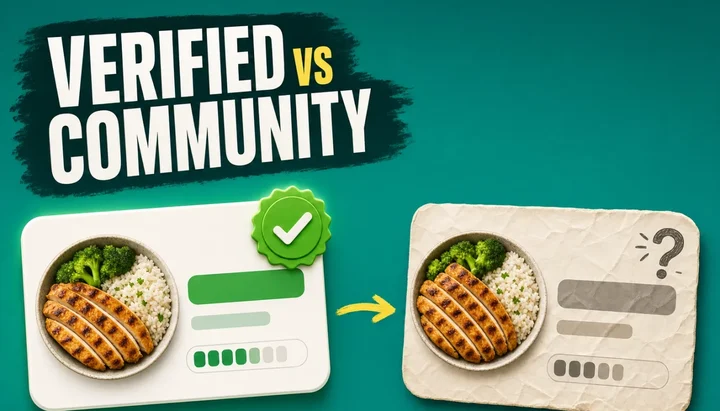
Researchers at the University of Sydney took three days of identical food records and typed them into 16 different food logging apps. The apps did not agree. For a Western diet, they overestimated energy by an average of 1,040 kJ, roughly 249 calories. For an Asian diet, the same apps underestimated by an average of 1,520 kJ, roughly 363 calories (Li et al., Nutrients, 2024). Same food, same person typing, a swing of about 600 calories depending on what was on the plate.
Nothing about the food changed. What changed was the database underneath, and which entry got picked out of it.
As a nutritionist working with the NutriScan team, I spend a lot of time looking at food logs that people are frustrated with. The complaint is almost always the same: "I logged the same lunch on Monday and Thursday and got different numbers." That is not a bug in the app. That is the difference between a verified entry and a community entry, and it is the single most controllable source of error in your log. 📊
TL;DR: verified vs community food entries
- Verified means reviewed, not measured. MyFitnessPal, Cronometer and MacroFactor each define it differently, and all three say reviewed entries can still be wrong.
- The reference database behind most generic entries, USDA SR Legacy, stopped updating in April 2018, and about 30% of essential nutrient values are missing from it.
- Community entries fail in patterns: serving-size mismatches, label-only data (under 50 nutrients), reformulation lag and duplicate piles.
- The biggest day-to-day error is tapping a different duplicate on Thursday than you tapped on Monday. A one-hour audit of your top 10 foods fixes it.
IMPORTANT
Your entry-accuracy plan at a glance.
A quick roadmap so you can act fast.
⏱️ Progress 0/4 • ~0 minutes in • Keep going
⏳ Step 1: What "verified" means in each app
⏳ Step 2: Where the numbers come from, and the 2018 freeze
⏳ Step 3: How community entries fail, and the 50-nutrient test
🔍 The 1-hour audit that fixes your next 300 meals (revealed near the end)
The Same Lunch, Two Different Numbers
Here is the mechanism, in plain terms. Most tracking apps do not have one database. They have several, stacked into one search box.
Some entries come from laboratory analysis, where food was chemically measured in a research setting. Some come from a manufacturer transcribing its own label. Some come from another user typing numbers into a form at 11pm. All three land in the same search results, often looking almost identical, sorted by whatever the app thinks you want.
When you tap the first result on Monday and the third result on Thursday, you have not made a small mistake. You have switched data sources. The calorie difference between two entries for the same food can be larger than the deficit you were trying to run.
 Twelve entries for "chicken breast", four different calorie counts, and you have 40 seconds before the meeting starts.
That is the honest answer to what changes accuracy day to day. It is not your scale, your metabolism, or the weather. It is which row you tapped.
What "Verified" Means in the App You Actually Use
The word verified has no shared definition across apps. Each one uses it to mean something different, and each one publishes that definition on a page almost nobody reads.
MyFitnessPal splits its database into three tiers. Best Match entries sit at the top of search results and are, in the company's words, "created and verified by MyFitnessPal's team of registered dietitians." Green check-marked foods have been "reviewed or added by MyFitnessPal." Everything else is a member submission, and the company is direct about it: "Anytime you see a food without a check, it was submitted by a MyFitnessPal member like you and has not been reviewed by MyFitnessPal" (MyFitnessPal blog, March 2025).
Worth reading twice: the check mark means reviewed, not measured. MyFitnessPal's own support page adds the caveat most articles skip, saying that "even verified entries can sometimes have mistakes," and also that "just because an item does not have a check mark does not mean it has inaccurate nutrition information" (MyFitnessPal Help). The badge is a signal, not a guarantee, and its absence is not a warning.
Cronometer goes further and refuses to publish anything unreviewed. Its data sources page states that "every user submitted food is reviewed by our curation team before being added to the database," and that user-submitted branded products contain "only the nutrition information from the nutrition facts table on the packaging or on the brand's official website" (Cronometer Data Sources). Instead of a badge, it labels each entry with its actual origin: NCCDB, USDA, CRDB, Nutritionix.
MacroFactor takes the same route with different wording, describing its two sources as "highly vetted research databases, and verified user-submitted entries," where submissions "are all checked for accuracy by other humans before the foods are added to the public database" (MacroFactor Help).
Open Food Facts, the open barcode database that quietly powers or supplements a lot of scanning features, is the most honest of all. Its API documentation states plainly that data "is provided voluntarily by users," that "there are no assurances that the data is accurate, complete, or reliable," and that "the user assumes the entire risk of using the data" (Open Food Facts API docs).
| App | What "verified" means | Unreviewed entries visible? |
|---|---|---|
| MyFitnessPal | Reviewed or added by MFP staff (green check); Best Match built by dietitians | Yes, everything without a check |
| Cronometer | Every submission reviewed by curation team before publishing; source label on each entry | No |
| MacroFactor | Research databases plus human-checked submissions | No |
| Open Food Facts | None; volunteer data, no assurances | Yes, all of it |
IMPORTANT
Checkpoint: here's where you are right now.
Quick status update so you always know the next best move.
⏱️ Progress 1/4 • ~2 minutes in • Keep going
✅ Step 1: What "verified" means in each app (done)
👉 Step 2: Where the numbers come from, and the 2018 freeze (you're here)
⏳ Step 3: How community entries fail, and the 50-nutrient test
🧩 The 1-hour audit that fixes your next 300 meals (coming soon)
Where the Verified Numbers Actually Come From
Verified data is not one thing either. It arrives by three very different routes, and the route determines how much you can trust the micronutrients.
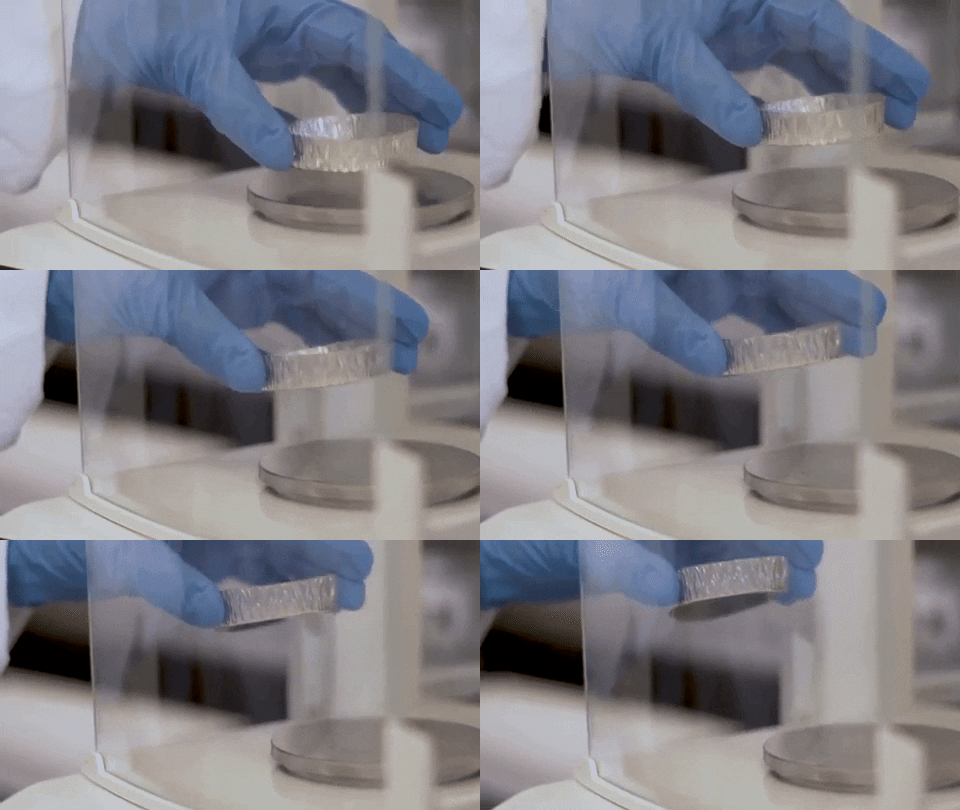 This is what "lab-analyzed" actually looks like. Most of your food log never came anywhere near a room like this.
Laboratory analysis. Food is chemically measured. Cronometer's largest source, the Nutrition Coordinating Center database curated by the University of Minnesota, holds over 17,000 food entries with data on 70 nutrients, and USDA Standard Reference 28 adds over 8,000 entries with over 70 nutrients each (Cronometer Data Sources). These are the entries with a full nutrient profile.
Label transcription. Someone copies the nutrition facts panel. This is accurate for what the label lists and silent about everything else. A label lists maybe 15 values. The food contains hundreds.
Industry submission. This one surprises people. The USDA's own branded food database is not lab work. USDA describes Branded Foods as "data from a public-private partnership that provides values for nutrients in branded and private label foods that appear on the product label," and states that "information in Branded Foods is received from food industry data providers" (USDA FoodData Central FAQ). A .gov source for a packaged food is a manufacturer's label published under a government name.
A USDA logo on a barcode result is not lab verification
A barcode result carrying the USDA name is the manufacturer's own claim, standardized in presentation. That is useful and it is not the same thing as measured nutrition.
The Gold Standard Stopped Updating in April 2018
This is the fact I wish more people knew, and it comes straight from USDA.
SR Legacy is the database that, in USDA's words, "has provided the values for most other public and private food composition databases." It is the base for generic entries across the whole industry. And USDA states clearly that SR Legacy "released in April 2018, is the final release of this data type and will not be updated," directing users to newer data types for anything current (USDA FoodData Central FAQ).
Your app may still be serving you those values. They were good values. They are also frozen.
USDA is careful about the limits of composition data in general, noting that nutrient values "reflect those found in particular foods sampled at particular times from particular locations," which makes each number a "snapshot in time" that "may well change over time."
There is a matching finding in the research literature. When a team evaluated database completeness, they defined complete as having values for all 15 nutrition facts panel measures and all 40 essential nutrients identified by the National Academies. Using SR Legacy as the reference, they found mean completeness of 84.9% for the nutrition facts panel measures and 70.3% for the essential nutrient measures, concluding that current databases "do not yet provide truly comprehensive food composition data" (Li et al., Advances in Nutrition, 2023).
Roughly three in ten essential nutrient values are missing from the gold standard itself. Verified means carefully compiled. It has never meant complete.
Even Verified Data Has Two Right Answers
Here is a detail that dismantles the idea of one true calorie number.
USDA calculates energy two ways. Most values use the Atwater general factors of 4, 9 and 4 calories per gram for protein, fat and carbohydrate. Some foods also carry values calculated with Atwater specific factors, which adjust for how digestible that particular food is. Both appear in FoodData Central, and USDA's own example screenshot shows the same food listed at 85 calories by general factors and 77 calories by specific factors (USDA FoodData Central FAQ).
That is a 9% spread on one food, from one government database, with zero error involved. USDA's guidance is to understand the variability and decide which data suits your purpose.
The second detail sits in the same document. FoodData Central reports a Limit of Quantification, the lowest amount that can be reliably measured. USDA notes that calculations "use zero to calculate results" and that "unavailable LOQ values may be reported as zeros."
A zero is not always a zero
A zero in a nutrient column can mean none present, or it can mean not measured. Your app shows you the same 0 either way. If you are chasing a micronutrient target and seeing zeros, some of those zeros are missing data shown as a number.
Cronometer's own guidance lands in the same place, describing its figures as meant to be "accurate numbers but not precision truths" (Cronometer blog).
IMPORTANT
Checkpoint: midway progress update.
You're halfway - the practical part starts here.
⏱️ Progress 2/4 • ~4 minutes in • Keep going
✅ Step 1: What "verified" means in each app (done)
✅ Step 2: Where the numbers come from, and the 2018 freeze (done)
👉 Step 3: How community entries fail, and the 50-nutrient test (current)
⏳ The 1-hour audit that fixes your next 300 meals (next)
Community Entries: What Actually Goes Wrong
Community entries fail in patterns, not randomly. Knowing the patterns lets you spot a bad one in about two seconds.
The serving-size mismatch. Values entered per 100 grams but labeled as one cup, or per piece when the label was per package. This produces errors of 100% or more, and it is by far the most common.
The label ceiling. A community entry can only contain what the label contains. Cronometer's guidance makes the practical test explicit: "If a food has 50 or less listed nutrients, chances are the data is coming strictly from the nutrition label." Their example is worth memorizing. Scanning a package of Trader Joe's Brazil nuts returns an entry with 17 listed nutrients. The generic Brazil Nuts, Unsalted entry from the lab-analyzed database carries data for 76 nutrients (Cronometer blog). Brazil nuts are one of the best selenium sources on earth. The label entry does not mention selenium at all. You ate it. Your log did not record it.
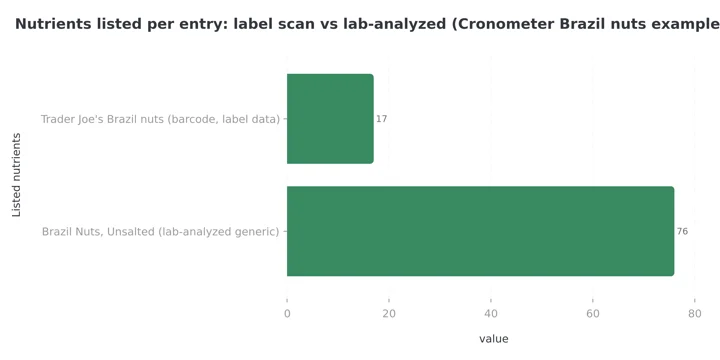 Figure 1: Same food, two entries. The label entry carries 17 nutrients, the lab-analyzed entry 76. Source: Cronometer blog, accurate data tips.
The reformulation lag. Manufacturers change recipes. Databases follow slowly. MacroFactor describes the problem running in both directions: an entry may be out of date, or the database may update before you finish the older package sitting in your cupboard, so your food disagrees with the current entry (MacroFactor Help).
The duplicate pile. Popular foods accumulate dozens of near-identical entries with different numbers. Nothing tells you which one the last 10,000 people used correctly.
I want to be fair here. Community entries are also the reason your regional grocery brand exists in the app at all. A curated database of more than 1,360,000 verified items, which is what MacroFactor reports, is smaller than one holding over 20.5 million foods, which is what MyFitnessPal reports. Both numbers are real. They are optimizing for different failures.
The Barcode Is Not a Verification Badge
Scanning feels authoritative. A machine read a code, so the number must be right.
What actually happened is that the app looked up a label transcription, often from a branded database sourced from industry or from other users. Cronometer tells its own users to be careful with the barcode scanner precisely because those results carry label-only nutrient data, meaning "you might not be getting credit for some of the nutrients you're eating because it wasn't listed on the nutrition label."
The barcode is excellent at one job: telling you the manufacturer's stated calories and macros for a packaged food. That is genuinely the right tool for packaged food. It is a poor tool for micronutrients, and it tells you nothing about whether the entry was reviewed. If barcode speed is your priority, our barcode scanning comparison covers which apps do it well.
Three Days, Three Entry Choices 🍽️
Take one repeated lunch: grilled chicken, cooked white rice, and a spoon of oil.
Monday. You search chicken, tap the first result, a community entry labeled "grilled chicken." No brand, no source, 12 listed nutrients. You get calories and three macros. Iron, zinc and B12, all of which chicken actually delivers, come through as zeros or as nothing at all.
Tuesday. You scan a barcode on the rice packet. Accurate calories from the label. Fiber may be listed. Magnesium and folate almost certainly are not.
Thursday. You use lab-analyzed generic entries for all three foods and weigh them. Calories land close to Monday's. The micronutrient panel is completely different, because now the data exists.
Your calorie total looked stable across the week. Your nutrient record was three different documents. If you are tracking calories only, entry choice matters less than people claim. If you are tracking anything else, it decides everything. This is exactly why Cronometer Gold is priced around micronutrient depth rather than logging speed.
What Changes Day to Day: The Direct Answer
| What changes | How much it moves your numbers | How to control it |
|---|---|---|
| Entry source (lab vs label vs user) | Small for calories, very large for micronutrients | Check the source label before tapping |
| Which duplicate you tap | 10% to 100%+ on a single food | Save it as a favorite or meal after you verify it once |
| Serving size units | Up to several hundred percent | Weigh in grams, not cups |
| Reformulation and database age | A few percent, silently | Re-check entries for foods you eat daily |
| Cuisine coverage | Hundreds of calories per day | Build custom entries for your staples |
| Zeros that mean "not measured" | Invisible until you rely on them | Prefer entries with 70+ listed nutrients |
The row that matters most for most people is the second one. Everything else is background noise compared to tapping a different duplicate on Thursday than you tapped on Monday.
What the Research Says About Who Logs Better
Two studies answer this well, and they point the same direction.
A Belgian validation study compared MyFitnessPal against the Nubel national food composition database. Overall it held up reasonably for macros, but it underestimated protein by 7.8%, carbohydrate by 6.4% and fat by 1.7%, and did poorly on cholesterol and sodium. The authors named the cause directly, attributing the underestimation most likely to "incomplete or missing information about nutrient composition for some food items in the database" (Evenepoel et al., JMIR, 2020).
The second is more interesting because it isolates the human. Researchers had 37 Filipino adults with obesity log five days of food in MyFitnessPal, then had three nutritionist-dietitians independently log the same paper food records in the same app. The dietitians agreed closely with each other on everything except fat estimates, which the authors call good intercoder reliability. But all of them disagreed with the Philippine Food Composition Tables reference, with MyFitnessPal underestimating energy, carbohydrate and fat while overestimating protein. Their conclusion is the practical one: "prior nutrition knowledge is a factor in ensuring the accuracy of energy and nutrient intake data generated using MyFitnessPal app" (Banal et al., BMJ Nutrition, Prevention & Health, 2024).
Read those together. Trained people using the same database produce consistent results. Untrained people produce scattered ones. The database sets the ceiling on your accuracy. Your entry-picking skill decides how close to that ceiling you land. That skill is learnable in about a week, which is the most encouraging thing in this article. 💡
If You Do Not Eat a Western Diet, This Section Matters Most
Return to the opening number, because it is the most under-discussed finding in this field. Sixteen apps, identical food records: energy overestimated by about 249 calories on a Western diet, underestimated by about 363 calories on an Asian diet (Li et al., Nutrients, 2024). The same authors call for expanding food databases and note that AI models need training for "mixed dishes and culturally diverse foods."
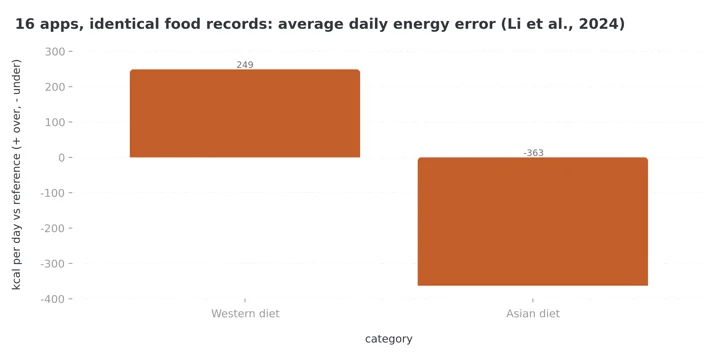 Figure 2: The same 16 apps overestimate a Western diet by about 249 kcal a day and underestimate an Asian diet by about 363 kcal. Source: Li et al., Nutrients, 2024.
The bias is structural, not accidental. Lab-analyzed reference databases were built where the funding was. Community entries fill the gaps, which means the further your cuisine sits from the database's origin, the more of your log runs on unreviewed data.
MacroFactor states this openly rather than hiding it, listing strong barcode coverage in the United States, Canada, the UK, Australia, Ireland, New Zealand, Japan, France and Spain, and fewer localized options elsewhere (MacroFactor Help).
If you eat mostly home-cooked regional food, no amount of tapping carefully will fix this. Build custom entries once for your ten most-eaten dishes and the problem mostly disappears.
IMPORTANT
Checkpoint: final stretch before the reveal.
One last nudge - the audit is next.
⏱️ Progress 3/4 • ~7 minutes in • Keep going
✅ Step 1: What "verified" means in each app
✅ Step 2: Where the numbers come from, and the 2018 freeze
✅ Step 3: How community entries fail, and the 50-nutrient test
✨ The 1-hour audit that fixes your next 300 meals (about to reveal)

7 Ways to Pick a Better Entry ✅
- Read the source line before you tap. Cronometer prints it. MacroFactor and MyFitnessPal use badges. If your app hides the source entirely, treat every entry as unreviewed.
- Count the nutrients. Under 50 listed nutrients means label data, over 70 means lab data (Cronometer blog). This one test tells you more than any badge.
- Use generic entries for whole foods, branded entries for packages. A raw chicken breast should never come from a barcode. A protein bar should always come from one.
- Weigh in grams. Cup and piece measurements carry more error than the database does. This is the cheapest accuracy you will ever buy.
- Verify once, then save. Check an entry carefully the first time, then save it as a favorite, a meal, or a custom food. You are removing the daily guess permanently.
- Be suspicious of round numbers. An entry reading exactly 100 calories and exactly 10 g protein was estimated by a person, not measured.
- Report bad entries. Every major app has a report function. Cronometer, MyFitnessPal and MacroFactor all route reports to a review team, and the fix reaches everyone.
The 1-Hour Audit That Fixes Your Next 300 Meals 🧭
You have been patient. This is the part that actually changes your numbers, and it costs one hour, once.
The logic is simple. Ten foods cover most of anyone's calories. If those ten entries are right and never change, the rest of your log can be sloppy and your trend line will still be true. Everything above was the why. This is the how.
- List your top 10 foods. Open last week's diary. Ten foods will cover most of your calories. This is your entire problem surface.
- Check each one's source. Note whether it is lab-analyzed, label-derived, or unreviewed.
- Search each food again and compare. Look at the other entries for the same food. If the calorie spread across entries is more than 15%, you have found a real risk.
- Replace the worst offenders. Swap unreviewed entries for lab-analyzed or check-marked ones. Cross-check anything strange against USDA FoodData Central, which is free and public.
- Lock them in. Save each corrected food as a favorite or custom entry so tomorrow's log cannot drift.
Ten foods ➡️ check source ➡️ compare duplicates ➡️ replace ➡️ save. An hour of this fixes the accuracy of your next 300 meals. Very little else in tracking pays back at that rate.
Why 15% is the threshold
Two lab-analyzed entries for the same generic food rarely differ by more than 10%, and USDA's own general-versus-specific Atwater spread is about 9%. A spread above 15% between entries almost always means one of them has a serving-size or source problem, not natural variation.
Where Photo Logging Fits In This Picture
NutriScan works differently, and the tradeoff is worth stating honestly rather than selling.
There is no entry list to choose from. You photograph the meal or describe it, and the app estimates the dish rather than asking you to match it to a database row. That removes the failure mode this entire article is about: you cannot tap the wrong duplicate if there are no duplicates to tap. It also removes something real. There is no source label to inspect, so you cannot check whether a number came from a laboratory or from a nutrition panel.
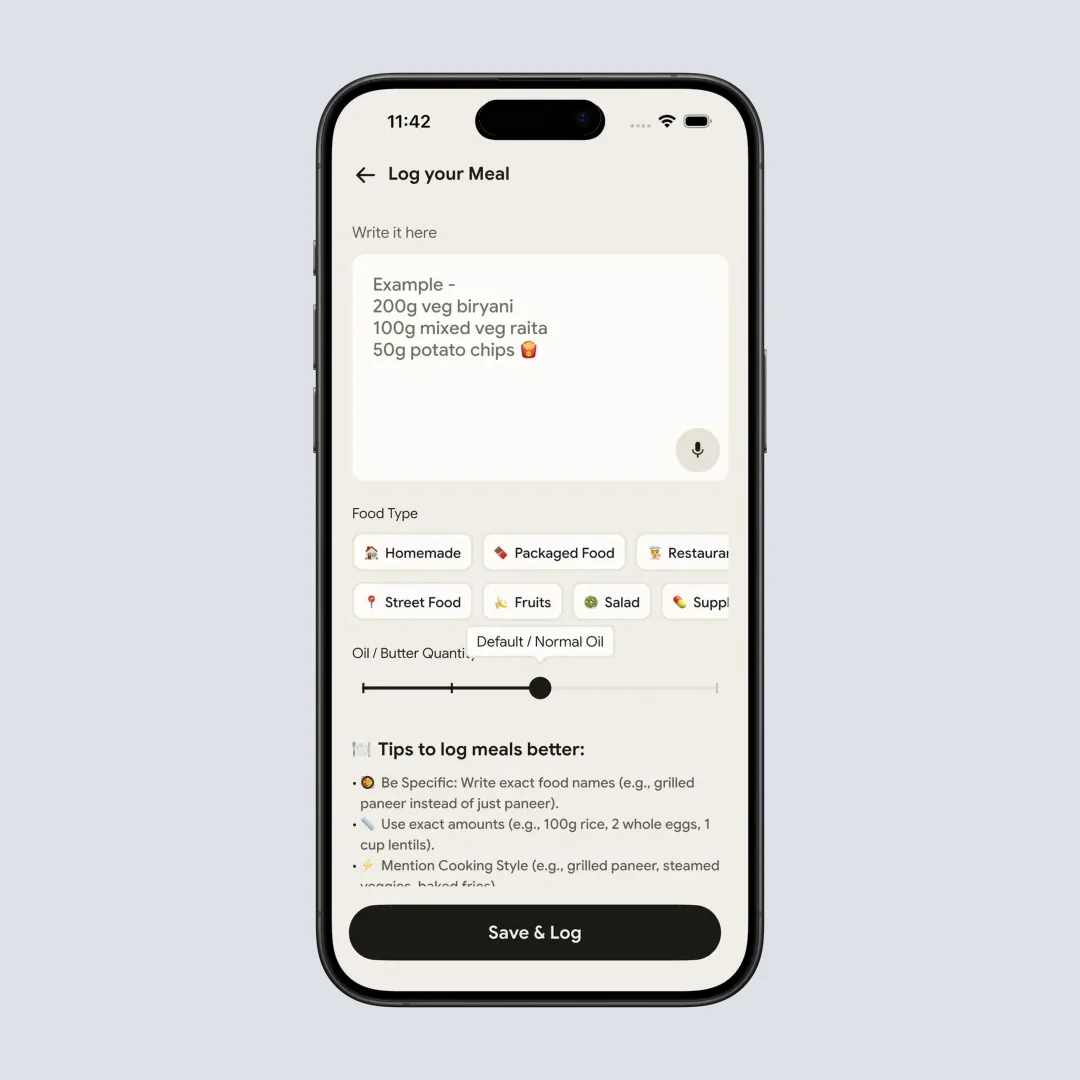
Home > Camera Icon: instead of picking a database row, you set the food type, cooking method and oil level, and the estimate adjusts.
What replaces entry-picking is context. The oil level slider (No Oil, Low Oil, Default / Medium Oil, High Oil), the cooking method selector with 11 options, and the 8 food type tags change the estimate, which matters because cooking oil is the most commonly under-logged ingredient in home cooking and no database entry knows how much you used. Portion adjustment and adding a missed item work the same way a good editable entry does. There is no barcode scanner, so packaged food goes in through the Packaged Food tag with manual or voice entry, and for label-exact numbers on packaged food a barcode app is the better tool. I would use one.
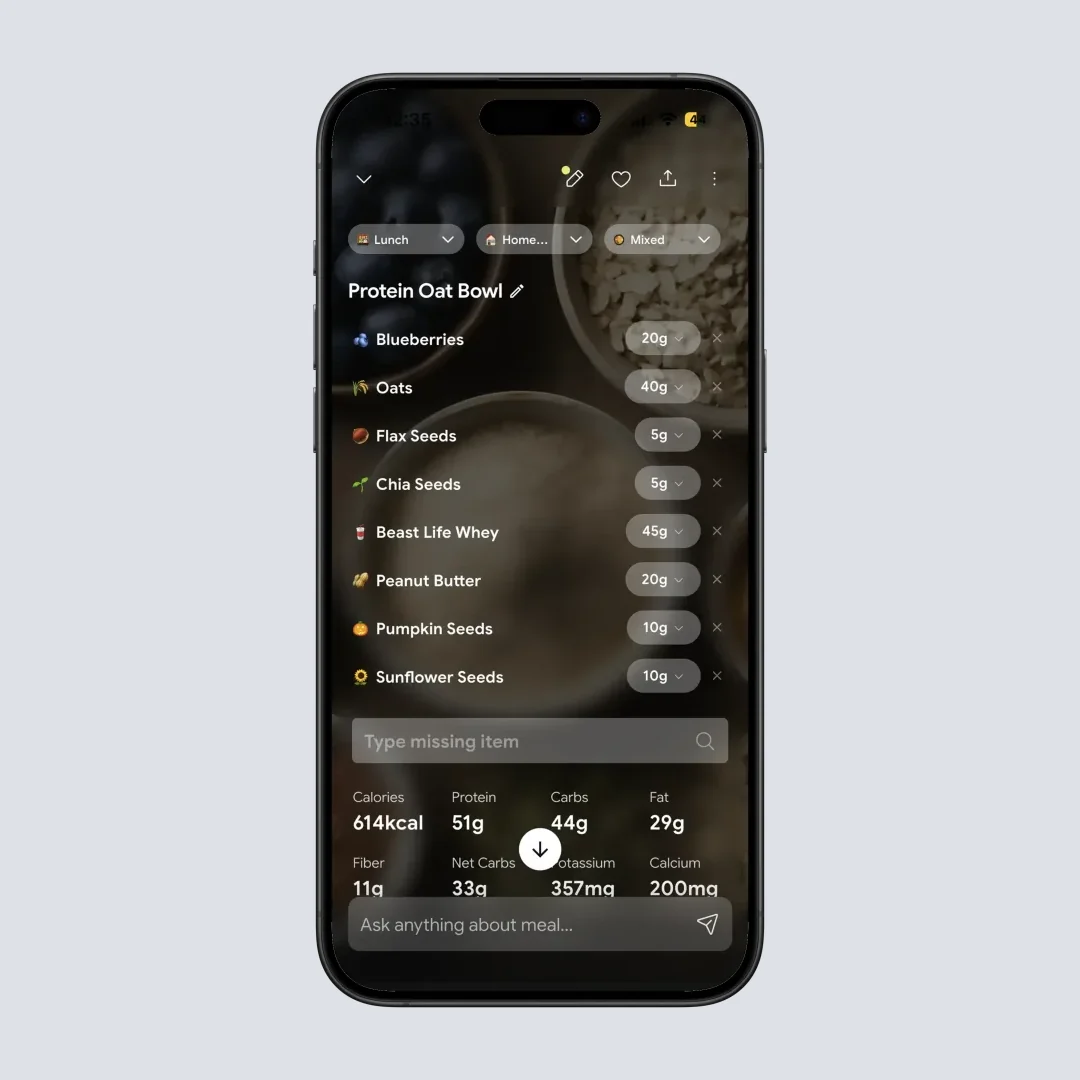
Home > Meal Item > Nutrition Details Page: macros, micronutrients and the NutriScore on every meal, on the free plan too.
Neither approach is inherently more accurate. A carefully chosen lab-analyzed entry with a weighed portion beats any estimate. An estimate beats the community entry you tapped without looking, which is what most people compare against in practice. The meal scan guide explains what the estimate does and does not account for. Pricing for both routes is broken down in our NutriScan pricing guide and our MyFitnessPal pricing guide, and the photo route is covered in more depth in our guide to logging mixed dishes.
My Verdict
Verified entries are better. That part is not close. A reviewed entry from a lab-analyzed source gives you a fuller nutrient profile, fewer catastrophic serving-size errors, and numbers that came from measurement rather than memory.
But verified does not mean correct, complete, or current. The reference database behind most generic entries stopped updating in April 2018, and the same food carries two different official calorie values depending on which Atwater factors were used (USDA FoodData Central). Around 30% of essential nutrient values are missing from that reference (Li et al., 2023). And branded data with a government logo on it is still a manufacturer's label.
So the useful question is not which database is perfect. None is. The question is whether you are making the same choice every day. A slightly wrong entry used consistently will show you a real trend. A different entry every day will show you noise, and you will change your diet in response to numbers that only measured your tapping.
IMPORTANT
Recap: everything you completed this round.
You finished the run - save this for next time.
⏱️ Progress 4/4 • ~9 minutes in • Nicely done
✅ Step 1: What "verified" means in each app
✅ Step 2: Where the numbers come from, and the 2018 freeze
✅ Step 3: How community entries fail, and the 50-nutrient test
✅ The 1-hour audit that fixes your next 300 meals (revealed)
Pick your ten foods. Verify them once. Save them. Then stop thinking about databases and get on with eating.
Track your meals with NutriScan if you want to skip the entry list entirely, or pick a curated database app if you want to audit every source line. Consistency beats both. If you want a target to log against, the online macro calculator gives you one in under a minute.
Frequently Asked Questions ❓
Q1: Does the green check mark in MyFitnessPal mean the entry is correct? It means the entry was reviewed or added by MyFitnessPal and is considered accurate and complete. The company's own support page adds that "even verified entries can sometimes have mistakes," and that a missing check mark does not mean an entry is wrong. Treat it as a useful signal rather than proof.
Q2: Is a barcode scan more accurate than searching by name? For packaged foods, usually yes on calories and macros, because it pulls the manufacturer's label. For micronutrients it is often worse, because label data lists only what regulation requires. Cronometer's example of Trader Joe's Brazil nuts showing 17 nutrients against 76 in the lab-analyzed entry illustrates the gap (Cronometer blog).
Q3: Why do two entries for the same food show different calories? Usually a different serving-size basis, a different data source, or a reformulated product. Compare the gram weight first. Most large discrepancies turn out to be a per-100g value labeled as a cup or a piece.
Q4: Should I switch apps to get a better database? Only if you track micronutrients or eat mostly whole foods, where lab-analyzed sources genuinely matter. If you track calories and macros, fixing your top ten entries in your current app delivers more accuracy than switching. MacroFactor's cost is only worth paying for the database if you will use the depth.
Q5: Are user-submitted entries always bad? No. Some apps review every submission before publishing it, which is what Cronometer and MacroFactor both describe doing. An unreviewed submission in a large open database is the risky case, and Open Food Facts says so directly in its own API documentation, stating there are "no assurances that the data is accurate, complete, or reliable."
Q6: What is the fastest way to improve my logging accuracy today? Weigh your food in grams and save verified entries as favorites. Those two habits remove the two largest error sources, portion estimation and daily entry switching, without requiring you to learn anything about food composition databases.
This article is for informational purposes only and is not medical advice. Nutrition needs vary by individual. Consult a registered dietitian or physician before making significant changes to your diet, especially if you manage a health condition.