Best Apps for CGM Users in 2026 (Food Plus Glucose)
 ChatGPT
  Claude
  AI Mode
  Perplexity
TL;DR - Best CGM Apps 2026
• Best meal-to-curve loop: Signos. Photo, barcode or text, then the glucose response and a suggested action, sensors included.
• Best human support: Nutrisense, with one-to-one dietitian video calls that the company markets as often insurance covered.
• Cheapest complete setup: Levels at $15 a month plus a sensor you buy yourself. Nothing else comes close on price.
• Simplest first sensor: Stelo, and the only over-the-counter option that shares data straight to a clinician. Cheapest look: Lingo at $54 for two weeks.
• The honest note: NutriScan does not connect to a CGM. No glucose integration, no sensor pairing. We are the food half that outlives the sensor.
A 2025 systematic review and meta-analysis pooled 21 randomized trials covering 2,734 adults with type 2 diabetes. Using continuous glucose monitoring to guide food and lifestyle choices lowered HbA1c by 0.46 percentage points (95% CI: -0.71 to -0.22), raised time in range by 7.18 percentage points (95% CI: 2.77 to 11.58), and reduced body weight by a mean of 2.06 kg (95% CI: -3.74 to -0.38) (Bannuru et al., 2025). The sensor did not do that. The food decisions people made after reading the sensor did.
As a NutriScan nutritionist, I get the same message every week from people who just bought their first biosensor: "I can see the spike, but I do not know which part of dinner caused it." A glucose curve with no food log next to it is unreadable. This guide ranks the five apps that connect the two halves, tells you what each costs, and is direct about where NutriScan does not compete. Prices below are standard US prices as published in July 2026 and change by region and promotion.
IMPORTANT
Your CGM app plan at a glance.
A quick roadmap so you can pick the right app before you spend $150 a month.
⏱️ Progress 0/4 • ~0 minutes in • Keep going
⏳ Step 1: Why a CGM app is really a food app
⏳ Step 2: The three jobs I ranked on
⏳ Step 3: All 5 apps, ranked and priced
🔍 The 14-day protocol that decides whether the money was wasted (revealed near the end)
Why a CGM App Is Really a Food App 📈
Your sensor produces a number every five minutes. That is around 2,000 data points a week, and almost none of them mean anything on their own.
The value appears when a rise on the graph gets matched to the plate that caused it. That match is the entire product. The streaks, the badges and the weekly scores are packaging around that one link.
Which is why the app matters more than the sensor. In the United States in 2026, the two over-the-counter sensors, Dexcom Stelo and Abbott Lingo, use similar technology and similar two-week wear windows (Real Food Matters CGM comparison, 2026). What you feel day to day is the software wrapped around the readings and how fast you can tell it what you ate.
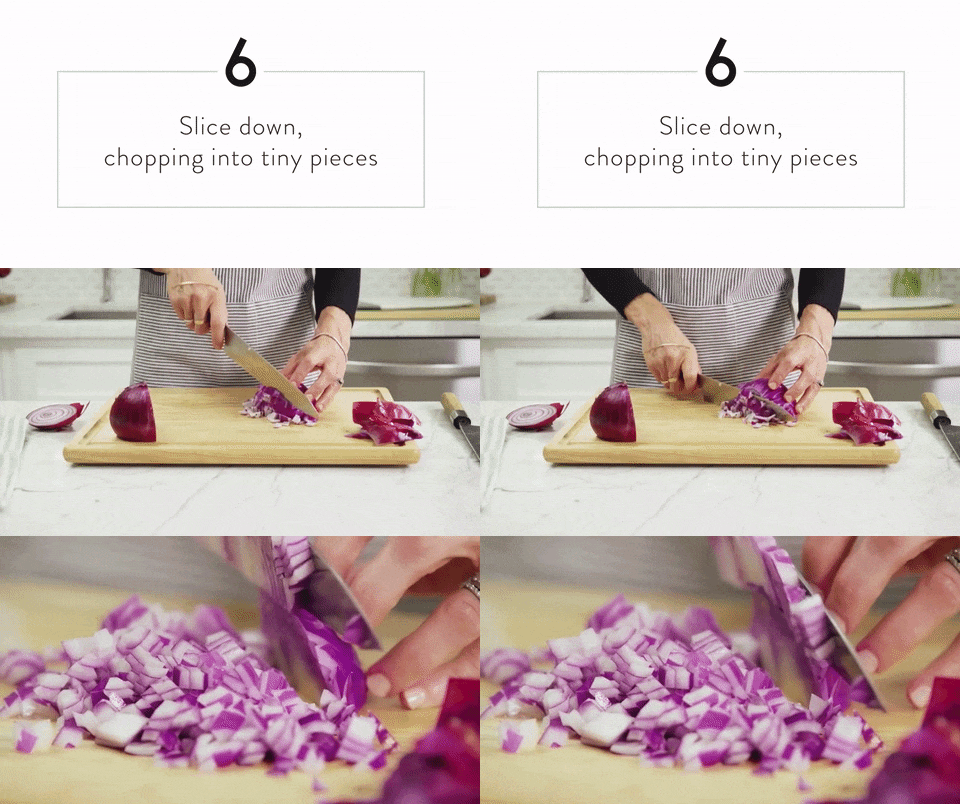 The sensor records the consequence. This is the cause, and it is the half most people forget to write down.
A case series from the International Diabetes Center followed four adults with type 2 diabetes who were not using insulin, and documented what CGM-guided nutrition changed in practice: less rice, fewer sugary drinks, better meal timing, different food pairings. Individual cases moved from 20% to 81% time in range, and from 47% to 94% (Ettestad et al., 2025).
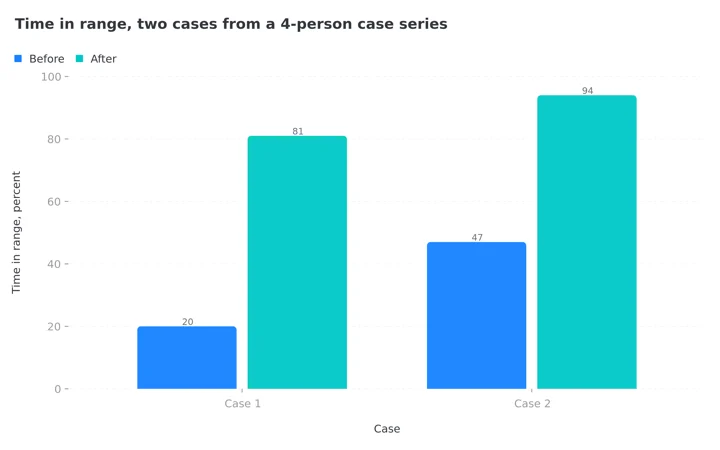 Figure 1: Two of the four documented cases. Read this as illustration and not as an expected result. Four people with no control group is the weakest study design in this article, and one author is affiliated with Dexcom.
The mechanism is the useful part. The sensor showed a consequence, and the food changed.
IMPORTANT
Checkpoint: here's where you are right now.
Quick status update so you always know the next best move.
⏱️ Progress 1/4 • ~2 minutes in • Keep going
✅ Step 1: Why a CGM app is really a food app (done)
👉 Step 2: The three jobs I ranked on (you're here)
⏳ Step 3: All 5 apps, ranked and priced
🧩 The 14-day protocol that decides whether the money was wasted (coming soon)
How I Ranked These Apps 📋
The best app for CGM users is the one that closes the gap between the plate and the curve fastest, so I judged each on three jobs, in this order of weight.
Job 1: The meal-to-curve loop. How fast can you log a real meal, and does the app place it on the glucose graph so you see cause and effect without doing the arithmetic yourself? An app that makes you type a 12-ingredient dinner will have an empty diary by day four.
Job 2: Turning a spike into an action. Data with no instruction is anxiety. Does the app tell you what to change, and is there a human involved when the answer is complicated?
Job 3: What survives the sensor. Sensors expire. Can you export your data, share it with a clinician, and keep your food history when you stop paying?
Who these apps are not for
Every product here is built for adults who do not use insulin. If you take insulin or have hypoglycemia, you need a prescription sensor with high and low alarms, because the over-the-counter models do not have them.
IMPORTANT
Checkpoint: midway progress update.
You're past the theory. The ranking starts now.
⏱️ Progress 2/4 • ~4 minutes in • Keep going
✅ Step 1: Why a CGM app is really a food app (done)
✅ Step 2: The three jobs I ranked on (done)
👉 Step 3: All 5 apps, ranked and priced (current)
🧩 The 14-day protocol that decides whether the money was wasted (next)
1. Signos: The Tightest Meal-to-Curve Loop 🥇
Signos is the only app here built so that logging a meal is as fast as taking a photo. You snap a picture, scan a barcode or type it, and the app shows how that food moved your glucose (Signos plans). That is Job 1 solved properly.
It handles Job 2 better than the sensor makers do. When something spikes you, the app suggests the type and intensity of movement most likely to bring the number back down, based on your own history, and you can chat with a dietitian inside the app. Sensors are included in the price rather than bought separately, and Signos uses the Dexcom Stelo biosensor exclusively, with two sensors shipped per month.
Pricing in July 2026: $127 a month on the 6-month plan, $150 a month on the 3-month plan, and $225 for a single month, all including sensors. A Signos+ plan at $199 a month pairs clinician-prescribed GLP-1 treatment with the same CGM app. Public reviews average 4.84 across 285 ratings on the company's review page.
The caveats are real. All sales are final, with no refunds or exchanges, so a single month is your only cheap way in. Checkout requires you to confirm that you are 18 or older, are not on insulin, do not have problematic hypoglycemia, are not on dialysis, and do not have an active eating disorder. That last one deserves respect rather than annoyance, because continuous food and glucose feedback is not a neutral experience for everyone.
Choose Signos if your goal is weight and you want the food log, the glucose curve and the coaching in one subscription.

2. Nutrisense: When You Want a Dietitian Reading the Curve 👩⚕️
Nutrisense sells the human, not the hardware. The program pairs biosensors with one-to-one video calls with registered dietitians, plus an in-app assistant and stress and sleep context around the glucose data (Nutrisense). A July 2026 price check put the CGM program near $152 a month, and the company markets its dietitian sessions as frequently covered by insurance, which is the unusual part of the model. Confirm both the current price and your own coverage before you buy, because the published rates move.
It ranks second rather than first on speed, not quality of support. A dietitian call every few weeks is a slower feedback loop than an in-app nudge fifteen minutes after lunch. If your questions are complicated, a fasting protocol you are unsure about, a medication interaction, a history of disordered eating, then that slower loop with a qualified person in it is worth more than any algorithm.
Nutrisense also sells dietitian coaching and bring-your-own-sensor options separately from the full CGM program, so you can buy the human without the hardware.
Choose Nutrisense if you want a professional interpreting your data and you would rather ask a person than read a chart.
3. Levels: The Cheapest Way to Add Food Logging to a Sensor You Own 💸
Levels is the value pick and it is not close. The entry membership, listed at $15 a month, gives you food logging, AI insights, adaptive programs, wearable data import and uploads of your past bloodwork, and you can bring your own sensor rather than buying one from them (Levels). Levels added support for Dexcom's over-the-counter Stelo biosensor specifically to make this cheaper (Levels on Stelo).
Do the arithmetic. A Stelo sensor subscription plus a $15 app costs meaningfully less per month than a bundled program, and you keep the choice of sensor.
Above that tier, Levels sells health packages rather than an app. Core, at $41 a month or $499 a year, adds two essential lab panels covering 28 or more markers, a month of glucose monitoring, and clinician review of your data twice a year. Complete, at $167 a month or $1,999 a year, adds comprehensive labs with over 100 markers, two months of monitoring, a 50-minute session with a functional nutritionist, and concierge support.
Those lab-heavy tiers are a longevity product rather than a food-tracking product. If your question is only "what did that pasta do to me," the $15 tier answers it and the rest is optional.
Choose Levels if you already own a sensor, or plan to buy Stelo separately, and want the lowest monthly cost for a proper food and glucose app.
4. Stelo by Dexcom: Simplest Start, and Your Doctor Can See It 🩺
Stelo is Dexcom's over-the-counter biosensor for adults who do not use insulin, worn for 15 days, with an app delivering glucose readings, meal logging, insights and reports (Stelo by Dexcom). A month's supply of two sensors runs around $99, with a monthly subscription option near $89 (Real Food Matters, 2026).
Two things make it the sensible default for a first-timer. The app is deliberately plain, so there is little to learn in week one. And it is currently the only over-the-counter option that supports sharing your data directly with a healthcare provider, which matters if your doctor or dietitian is going to review the fortnight with you.
Its food logging is basic next to Signos or Levels, and there are no high or low alarms, because over-the-counter sensors are not built for that job. Pair Stelo with a separate food app if you want richer logging, which is exactly the combination Levels is designed for.
Choose Stelo if you are new to this, want the least complicated app, or work with a clinician who will read your data.
5. Lingo by Abbott: Meal Scores at the Lowest Entry Price 🔬
Lingo is Abbott's over-the-counter biosensor and app, and it has the friendliest way to try continuous monitoring: a two-week plan with one sensor listed at $54 (Lingo by Abbott). An independent July 2026 comparison puts a two-sensor month near $89 (Real Food Matters, 2026).
The app is the more feature-rich of the two sensor-maker apps. Its signature is Lingo Count, a score applied to each meal, alongside logging and coaching-style guidance. Some people find a single number per meal clarifying. Others find it another thing to obsess over, and that split shows up consistently in practitioner commentary.
The practical drawback is data portability. Lingo does not currently support direct data sharing with a provider, and the file you can download does not include your notes (Real Food Matters, 2026). Like Stelo, it is for adults 18 and over, is not intended for people on insulin, and has no alarms.
Choose Lingo if you want the cheapest two-week look at your own metabolism and you like the idea of a per-meal score.
CGM Apps Compared: The Quick Table 📊
| App | Food logging | Human support | Sensor included | Typical price, July 2026 |
|---|---|---|---|---|
| Signos | Photo, barcode or text | Dietitian chat in app | Yes, 2 Stelo per month | $127 to $225/mo by term |
| Nutrisense | In-app logging | Dietitian video calls | Yes, in CGM program | About $152/mo |
| Levels | Full logging plus AI insights | Clinician review on higher tiers | No on entry tier | $15/mo entry, $41 or $167 higher |
| Stelo | Basic meal logging | No, but shares data with your clinician | Yes, sold as the device | About $99/mo for 2 sensors |
| Lingo | Logging plus Lingo Count meal score | No | Yes, sold as the device | $54 per 2 weeks, about $89/mo |
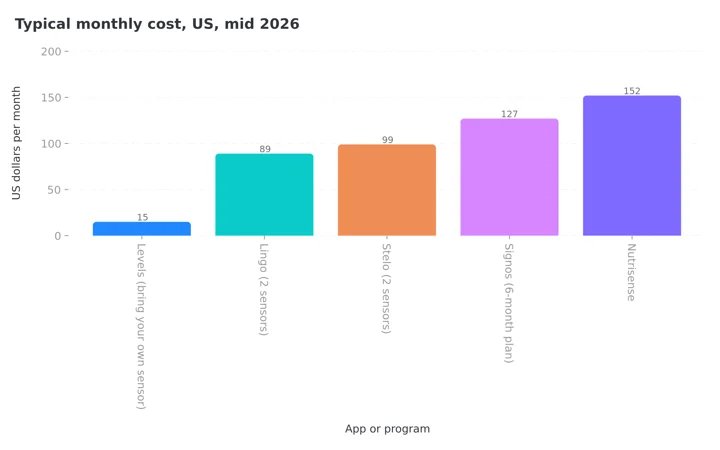 Figure 2: The spread is ten times from cheapest to dearest. Levels sits at $15 because you supply the sensor yourself, so add your sensor cost to that bar before comparing it with the bundled programs.
Prices vary by country and promotion. Confirm at checkout.
Where NutriScan Fits (The Food Half, With No Glucose) 🍽️
I will say this plainly, because a ranking is worthless if the author quietly promotes their own app past its evidence.
NutriScan does not connect to a CGM. There is no glucose integration, no sensor pairing and no spike graph. If you want food and glucose on one screen, buy one of the five apps above.
What NutriScan does is the half that outlives the sensor. Most people wear a CGM for two weeks to three months, learn which foods do what to them, and then stop paying $100 or more a month. The glucose data ends there. The eating pattern does not.
The food side runs on a photo scan with a crop screen, plus manual text entry, voice input and copying an earlier meal. On the crop screen you set the food type, the cooking method from 11 tags and an oil level across four steps, which matters because the same dish cooked two ways produces two different curves.

Home > Camera Icon > Click Picture. Cooking method and oil level are set before the scan is processed, which is the same variable a sensor keeps catching you out on.
Every meal returns macros, micronutrients and a NutriScore, and none of that is behind the paywall. Micronutrients are free on every meal, which is worth knowing if you are moving off a $150 program and expecting to lose detail. Read how the score works in our NutriScore guide.
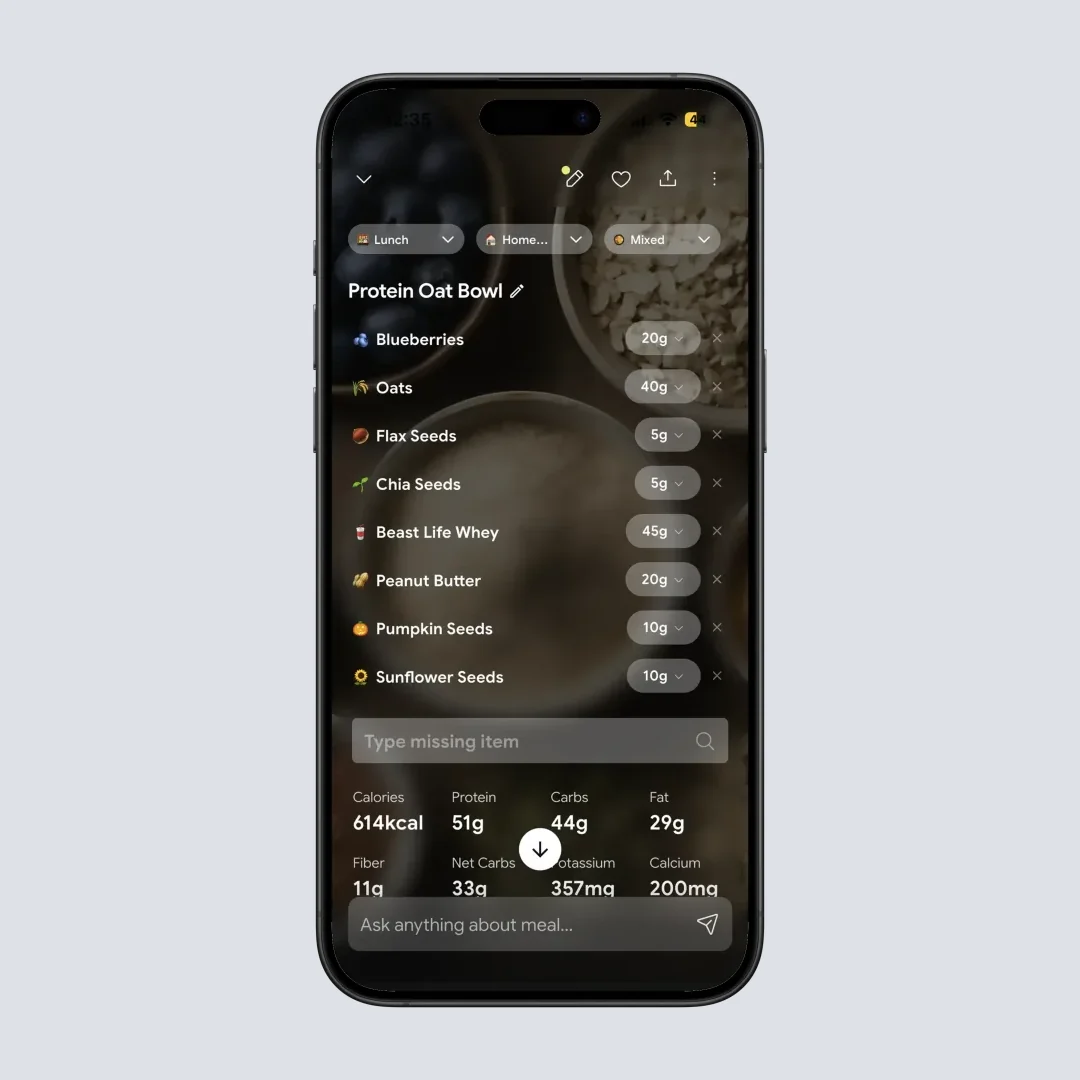
Home > Camera Icon > Click Picture > Crop Picture. Portion size stays editable after the scan, so a meal you underestimated at the table can be corrected later the same day.
Goal setting includes Diabetes alongside Weight Loss, Muscle Gain, Pregnancy, PCOS and Viral/Flu, so your daily targets reflect the reason you started. Five free scans a week is enough to test the scanner on the meals a food database usually cannot read, your curries, your restaurant plates, your mixed bowls, before you decide whether the rest is worth paying for. Our pricing breakdown covers what that costs, and my guide to tracking carbs for diabetes covers the apps built for that specific job.
The sequence I actually recommend
Wear a sensor for a month with a proper CGM app ➡️ write down the eight or ten foods that spiked you hardest ➡️ move to a cheaper everyday tracker ➡️ keep eating the way the sensor taught you. The expensive part is temporary. The habit is the point.
What a CGM Can and Cannot Tell You ⚠️
The strongest evidence for CGM-guided eating comes from people with diabetes, and that distinction matters before you spend $150 a month.
For type 2 diabetes, the meta-analysis is clear and recent: better HbA1c, better time in range, lower body weight across 21 randomized trials (Bannuru et al., 2025). For people without diabetes the picture is thinner. A 2025 systematic review of 7 studies covering 1,127 people without diabetes concluded that CGM shows promise for personalizing lifestyle changes, but that direct evidence of improvement in traditional cardiovascular risk factors is still limited and the studies are heterogeneous (Ahmed et al., 2025).
So if you do not have diabetes, treat the sensor as a teaching device rather than a treatment. ZOE dropped the sensor from its own program in 2025 and now predicts glucose response from a stool test; the ZOE pricing guide covers what that costs. Breath analyzers are sold as the cheaper proxy for the same question, and the Lumen pricing guide reads the four studies behind that claim. It is very good at showing you that your usual breakfast behaves differently from what you assumed. It has not been shown to extend your life.
Three limits worth knowing before day one
A rise after eating is normal physiology, not damage. Glucose going up after a meal is what glucose does. The question is how high and for how long, not whether it moved.
Sensor readings lag blood readings. The peak on your phone happened a few minutes before you saw it, so a number you catch mid-rise is already old.
Over-the-counter sensors carry no high or low alarms. They are not a safety device for anyone on insulin, and no app in this ranking changes that.
7 Tips for Getting Real Answers From Your Glucose Data 💡
- Judge the meal, not the moment. Look at how high it went and how long it stayed there, not the single highest number. A brief modest rise is not the same problem as a two-hour plateau.
- Test food order before you cut foods. Eating protein and vegetables before starch changes the curve for many people, and it costs nothing. Try that before you delete a food you love.
- Walk for ten minutes after your largest meal. This is the most reliable lever most people have, and every app here will show you the effect within the hour.
- Do not trust a single reading. Sensors have error, and pressure on the sensor while you sleep produces false lows. Repeat a surprising result before you act on it.
- Log the drink. Juice, sweetened coffee and alcohol change curves sharply and are the most commonly forgotten entries in any food diary.
- Compare like with like. Sleep, stress, illness and menstrual cycle phase all shift glucose responses. The same meal on a bad night's sleep is not the same experiment.
- Stop if the numbers are making you anxious. If checking has become compulsive or is driving restriction, the tool is doing harm. Talk to a professional and take the sensor off.
 Ten minutes after the biggest meal of the day. It is the one intervention every app in this ranking will let you see working in near real time.
IMPORTANT
Checkpoint: final stretch before the reveal.
One last nudge, the reveal is next.
⏱️ Progress 3/4 • ~7 minutes in • Keep going
✅ Step 1: Why a CGM app is really a food app
✅ Step 2: The three jobs I ranked on
✅ Step 3: All 5 apps, ranked and priced
✨ The 14-day protocol that decides whether the money was wasted (about to reveal)
The 14-Day Protocol That Decides Whether the Money Was Wasted 🧩
The method I promised at the top works in every app on this list.
Two weeks of sensor data is worth either one short list or nothing at all. The difference is entirely down to how you run the fortnight. Most people wear the sensor, watch the graph, feel briefly fascinated, and end up with no written record of what they learned. This protocol produces the list.
Day 1 to 3: change nothing. Eat exactly as you normally would and log everything. Without a baseline you cannot tell whether a later change did anything. Skip these three days and week two reads as noise.
Log the meal before you eat it, not after. Two minutes after the last bite you are already doing something else. Photograph the plate, then eat. Every app in this ranking supports a photo or a fast entry at the table, and the whole ranking above is a ranking of how painless this one action is.
Name the suspect ingredient. "Lunch" tells you nothing next month. "Rice, dal, two rotis, curd" tells you which component to test on its own later in the fortnight. Treat the log as a list of hypotheses you plan to check.
Run one A/B test a week. Same meal, one variable changed. Add protein first, or walk for ten minutes after, or swap white rice for a mixed grain. One change at a time, or the result means nothing.
Day 10: the list you actually paid for
By day ten, write down your top five spikers. Rank them by how high they went and how long they stayed high, not by the single highest reading you saw.
| What you record | Why it matters |
|---|---|
| The meal, named by component | So you can test the component, not the meal |
| Peak height and duration | Duration is the part people ignore and the part that compounds |
| What you did after | A walk or a delay changes the same meal's curve |
| Time of day | The same breakfast and the same dinner rarely behave alike |
| Sleep the night before | The most common reason two identical meals produced different curves |
Five rows. That table is the thing you bought for $150, and it survives long after the sensor stops transmitting.
Day 14: decide what continues. Before the last sensor expires, choose deliberately. Keep paying for glucose data, or move to a food tracker and keep the habits. Both are legitimate. Drifting into neither is what usually happens, and it is the outcome the subscription pricing quietly relies on.
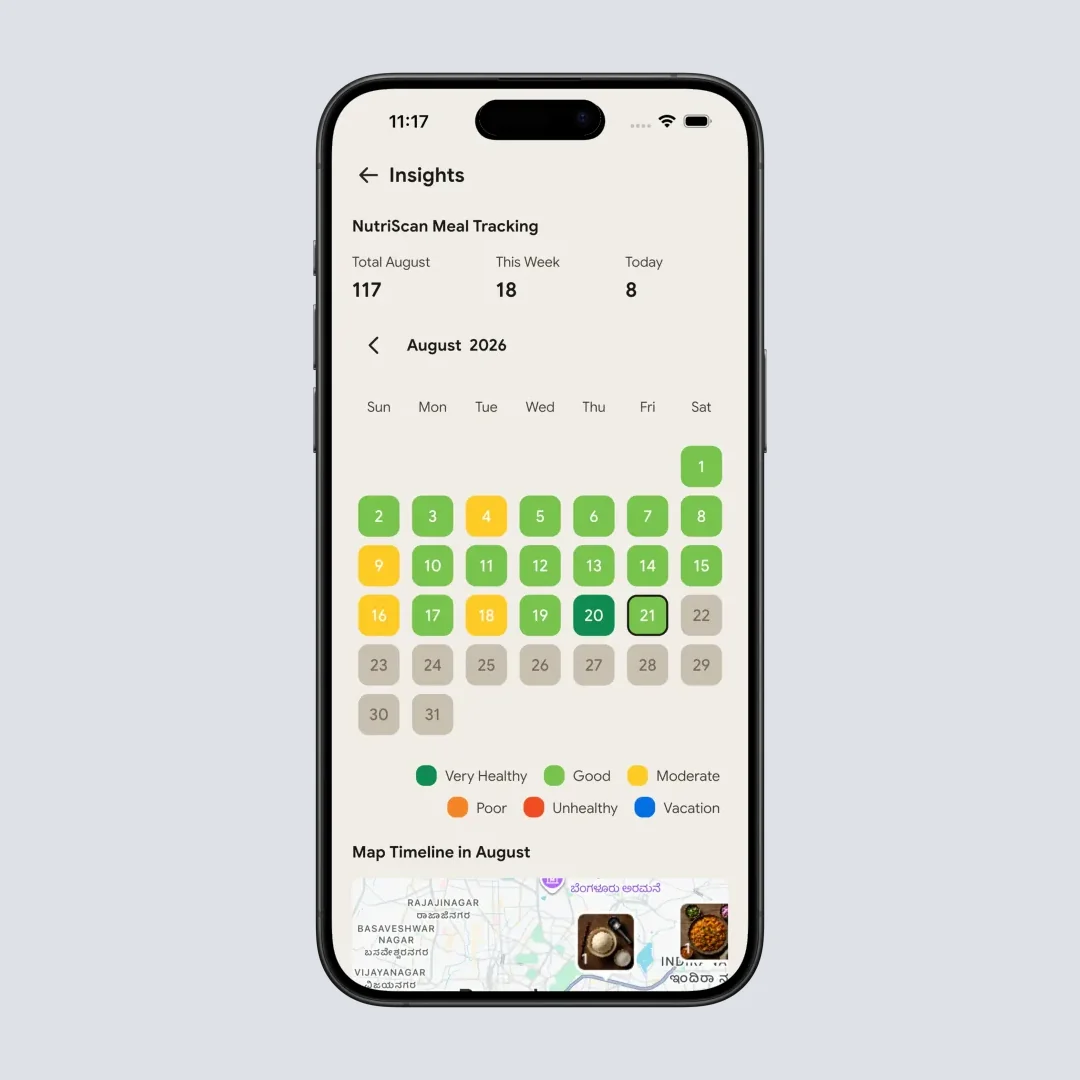
Top Tabs Navigation > Insights. The month view is the check that tells you whether the habit outlived the fortnight, which is the only test that matters after day 14. More in our insights guide.
Why 14 days and not three months
A longer wear window gives you more data and almost no more learning. Your personal trigger foods show up in the first fortnight because most people rotate a small set of meals. After that you are paying to re-confirm the same five findings. If your eating changes seasonally, a second fortnight six months later teaches you more than eight continuous weeks now.
What the Research Says 📚
The strongest current evidence is the 2025 systematic review and meta-analysis published in the Journal of Diabetes Science and Technology, authored largely by researchers affiliated with the American Diabetes Association. Across 21 randomized trials and 2,734 adults with type 2 diabetes, CGM used to guide nutrition and lifestyle produced better glycemia and lower body weight, with time in range improving by 7.18 percentage points (95% CI: 2.77 to 11.58) (Bannuru et al., 2025). The authors flag heterogeneity across trials, driven by differing baseline glucose control, diabetes duration and how CGM was used.
The mechanism was documented in the 2025 case series from the International Diabetes Center shown in Figure 1: participants cut high glycemic foods, changed meal timing and adjusted food combinations after seeing their own data (Ettestad et al., 2025). Case series have no control group and very small numbers, and one author works for Dexcom, so it explains a mechanism rather than proving an effect.
For everyone else, the honest summary is the 2025 Cureus review: promising for personalization, limited direct evidence on cardiovascular risk factors, heterogeneous studies (Ahmed et al., 2025).
All three land in the same place. The measured benefit follows a behavior change, and the behavior change follows a logged meal. No app improves anything on its own. If you want to see what your targets should be before you start, run your numbers through our diabetes macro calculator or the general macro calculator.
IMPORTANT
Recap: everything you covered this round.
You finished the run, save this for the week your sensor arrives.
⏱️ Progress 4/4 • ~9 minutes in • Nicely done
✅ Step 1: Why a CGM app is really a food app
✅ Step 2: The three jobs I ranked on
✅ Step 3: All 5 apps, ranked and priced
✅ The 14-day protocol: baseline ➡️ log before eating ➡️ name the ingredient ➡️ one A/B test a week ➡️ the day-10 list (revealed)
The Verdict: Which One Should You Buy? ✅
If you want one subscription that does everything, buy Signos on the 6-month plan at $127 a month. The photo-to-curve loop is the fastest here and sensors are included.
If you want a qualified person interpreting your data, and possibly some insurance coverage for that person, buy Nutrisense.
If you are cost-sensitive and comfortable buying hardware separately, buy a Stelo subscription and add the Levels app at $15 a month. That is the cheapest complete food-plus-glucose setup in 2026.
If you are simply curious, spend $54 on a two-week Lingo sensor or $99 on a Stelo month and learn your five biggest spikers. In India, HealthifyMe bundles a CGM into its coaching plans, which I broke down in my HealthifyMe CGM plan cost guide.
And when the sensor comes off, keep logging. Photograph your meals, keep your targets in view, and hold onto what the fortnight taught you. That is the part NutriScan is built for, and you can see how the scanner handles a plate in our meal scan guide. If a structured week of meals would help you hold the pattern, our diet plan guide covers what that looks like. 🍽️
Frequently Asked Questions ❓
Which app is best for logging food alongside a CGM in 2026?
Signos, because logging is a photo, a barcode scan or a typed entry, and the app shows the glucose response beside what you logged along with a suggested action. If you already own a sensor, the Levels app at $15 a month gives you food logging and insights for far less money.
Do I need a prescription to buy a CGM?
Not in the United States for wellness use. Dexcom Stelo and Abbott Lingo are both sold over the counter to adults 18 and over who do not use insulin. Neither has high or low glucose alarms. If you use insulin or have hypoglycemia, you need a prescription sensor such as the Dexcom G7 or FreeStyle Libre 3+.
What does a CGM app cost per month in 2026?
Roughly $54 for a two-week Lingo sensor, about $89 to $99 a month for Stelo, $15 a month for the Levels app if you bring your own sensor, about $152 a month for Nutrisense, and $127 to $225 a month for Signos depending on the term you commit to. Prices vary by country and promotion.
Does a CGM help if I do not have diabetes?
The evidence is weaker than the marketing suggests. A 2025 systematic review of 7 studies in 1,127 people without diabetes found promise for personalizing lifestyle changes but limited direct evidence of improvement in cardiovascular risk factors (Ahmed et al., 2025). Treat it as a two-week education in how your own meals behave rather than as a treatment.
Does NutriScan work with a CGM?
No. NutriScan has no glucose integration and does not pair with any sensor. It handles the food side: photo meal logging with a crop screen, manual text and voice entry, macros and micronutrients on every meal, a NutriScore, and goal settings that include Diabetes and PCOS. If you want food and glucose on one screen, choose Signos, Nutrisense or Levels.
What should I do when the sensor comes off?
Keep logging food. The glucose data ends when you stop paying, but the eating pattern does not. Write down your five biggest spikers before the last sensor expires, then move to a cheaper everyday tracker and keep eating the way the fortnight taught you.
This article is educational and is not medical advice. Continuous glucose monitors sold over the counter are not intended for people who use insulin or have hypoglycemia. Talk to a qualified healthcare professional before changing your diet or medication, particularly if you manage diabetes or any other medical condition.