Foodvisor vs Lifesum: Coaching Plan or Self-Serve Tracker
 ChatGPT
  Claude
  AI Mode
  Perplexity
Foodvisor vs Lifesum splits on one thing: Foodvisor puts a registered dietitian inside its Premium plan, and Lifesum has no human coaching at any tier. Choose Foodvisor if you want a person checking your log. Choose Lifesum if you want 22+ named diet programs and a weekly Life Score you steer yourself. Both take the same four inputs, photo, voice, text and barcode, and both hold a 4.6 App Store rating. Neither publishes one fixed price: Foodvisor's US annual listings run about $24 to $90 and Lifesum's about $50 to $120, standard US prices as of mid 2026 that move with your region and with whichever promotion is live.
As a NutriScan nutritionist, this is the matchup I get asked about most when someone wants more than a calorie counter but is not ready to pay for a human coach every month. Foodvisor leans into dietitian access and AI photo logging built around guidance. Lifesum leans into program variety and a self-serve tracker you run yourself.
A 2025 meta-analysis of 11 randomized trials found app-based tracking produced a modest but real drop in weight and BMI at four to six months, with the effect fading past six months. The authors put that down to apps lacking the personalized support people need to keep going, which is what feeds the dropout rate (Pujia et al., 2025). Which structure keeps you logging matters more than which feature list is longer.
Foodvisor vs Lifesum: Quick Comparison Table
| Feature | Foodvisor | Lifesum |
|---|---|---|
| Annual price (US) | ~$24-$90/yr (list SKUs, promo-variable) | ~$49.99-$119.99/yr (list SKUs, promo-variable) |
| Monthly price | $14.99-$39.99/mo | $7.49/mo on the current offer |
| Free trial | 14 days, via the referral program | Yes, length not published |
| Free tier | Yes, manual food-diary logging only | Yes, basic logging on Lifesum Standard |
| Dietitian coaching | Yes, in Premium (the Coach plan) | No |
| Diet programs | No published list, questionnaire-led plan | 22+ programs incl. Ketogenic, Mediterranean, 16:8 |
| AI logging modes | Photo, voice, text, barcode | Photo, voice, text, barcode |
| Family Plan | Yes, Apple Family Sharing, up to 5 extra members | No |
| App Store rating | 4.6/5 from about 17K ratings | 4.6/5 from about 150K ratings |
| Headquarters | Paris, France | Stockholm, Sweden |
Prices are standard US prices as of mid 2026 and change by region. Both apps run several SKUs at once, so treat any single figure as a snapshot of the offer that was live when we checked, on 7 August 2026.
The identical 4.6 ratings hide the real asymmetry, 17,000 ratings against 150,000. Both take the same four AI inputs, and both have cracks that show up in daily use.
 Daily food logging habits decide whether an app sticks for 60 days or gets deleted after 14
How the Coaching Models Compare 🧑⚕️
This is the category that decides the matchup. Logging speed, recipes and fasting all sit downstream of whether you want a person nudging you or a system you run yourself.
Foodvisor: Dietitian-Led Premium Plan
Foodvisor's Premium plan, branded the Coach plan, includes access to a registered dietitian alongside the AI photo logging and meal recommendations. You answer onboarding questions about goal, food preferences, allergies, and activity level, and the program comes out of that: "Based on the questionnaire you recently completed, Foodvisor has crafted a program tailored specifically for you," as its Premium page puts it. The human layer is sold on the same page as "Coaching by our dietitians".
The pitch is simple. You log meals with photos, a dietitian sees the trend, and the advice lands inside the app. For users who want accountability without hiring a private nutrition coach, that is the whole idea compressed into a subscription.
WARNING
Foodvisor publishes no contact schedule and no response time for its dietitian coaching, and never says a dietitian can change your targets. Read it as dietitian advice inside a tracking app, a starter version rather than a replacement for one-on-one practice.
Lifesum: Self-Serve Programs With Life Score Feedback
Lifesum has no human coaching layer at any tier. Its published Premium list runs AI Tracking, adjustable calorie and macro goals, meal plans and programs, favorites, detailed nutrients and the full recipe library. No person appears on it. The store subtitle reads "Nutrition Coach", but the coach is the app: nutritionists wrote the plans, and no tier gets you someone to talk to.
Premium unlocks 22+ Programs (eating philosophies) and Meal Plans (day-by-day calendars) across three goal tracks: Lose, Maintain, or Gain Weight. Lifesum's own list names 24 as of August 2026: Mediterranean, Scandinavian, Climatarian, Clean Eating, Ketogenic Easy, Medium and Strict, High Protein, 5:2, 6:1, Paleo, Vegan for a Week, Hormonal Balance, and 16:8 Morning or Evening fasting among them.
The feedback system is the Life Score, a 0 to 150 number built from 16 nutrition and exercise metrics: fruit, vegetable and unsaturated fat intake, water, and a balanced mix of strength, low-intensity and high-intensity exercise. It refreshes every Monday, banded from Off Track (0 to 30) up to Optimal (120 to 150). The single dial replaces a coach, on a weekly cycle rather than a live one.
TIP
The Life Score is best for users who like a single metric to chase. It only moves once a week, so it rewards a consistent week rather than a good day.
The Practical Difference
Foodvisor is for users who want a person checking the work, even occasionally. Lifesum is for users who want structure but trust themselves to follow it. If you have tried tracking alone and quit by week three, Foodvisor is the more honest fit.

How AI Photo Logging Compares 📸
Both apps lead with AI photo recognition, and both also take voice, text and barcode. The way each handles correction friction is where they split.
Foodvisor: Photo Recognition Built for Plate-Style Meals
Foodvisor was one of the first calorie apps to ship AI photo logging. The current model identifies items on a plate, segments them visually, and assigns calorie and macro values. It works best on simple, clearly separated foods, a chicken breast, a side of rice, a pile of green beans. Accuracy decreases with mixed dishes, sauces, casseroles, and regional foods not well-represented in the training set.
Foodvisor takes the same four inputs Lifesum does. Its App Store listing spells them out: photo, speaking to the app, typing a few words, and barcode.
A 2024 scoping review of AI dietary assessment pooled 25 studies and reported nutrient estimation errors in the 10% to 15% range, and named adapting to diverse food types as an open problem (Zheng et al., 2024). Those were research models. Neither app publishes an accuracy figure of its own.
Foodvisor's free tier does not ration photo scans, it does not have them. The help center describes free as manual logging into the food diary, and lists "Meal analysis with photos" under Premium.
Lifesum: AI Multimodal Logging With Text and Voice
Lifesum's AI accepts text, photo, voice, or barcode input. Type "two scrambled eggs and a slice of sourdough," and the AI estimates calories and macros. Snap a photo and it identifies items. Speak the meal and it transcribes and parses. The pitch is whichever input is fastest in the moment.
User reports since the AI pivot are mixed. Reviewers describe the diary showing one flat list instead of meal slots, with entries logged late landing under the wrong meal, and say corrections to AI-generated entries are harder to make than they used to be (App Store reviews, checked August 2026). Lifesum did not remove the old way of logging: Classic Food Tracking runs alongside AI, and AI can be switched off under Diary, Customise Diary, Track with AI (help center).
NutriScan: Photo Logging Built for Real Meals
For comparison, NutriScan focuses on photo-first logging for real meals, including the mixed dishes and regional foods that both Foodvisor and Lifesum can struggle with. Snap a photo, edit portions with a tap, and log in under 10 seconds. The meal scan feature asks you to confirm the portion, the cooking method and the oil level before the estimate lands on your day total, which is where photo estimates usually drift.

NutriScan Home > Camera Icon > Crop Picture - photo logging with portion editing for accurate macro tracking
How Diet Plans and Programs Compare 🥗
Both apps offer structured eating programs. Depth, variety and how they connect to coaching split them.
Lifesum: 13 Programs and 11 Meal Plan Calendars
Lifesum splits structured eating into Programs (the philosophy) and Meal Plans (the day-by-day schedule). Standouts include the Climatarian program for users who care about food's carbon footprint, Hormonal Balance, and the 16:8 fasting plans.
A Program adjusts your macro targets, food recommendations, and recipe suggestions to fit a philosophy. A Meal Plan layers a finite calendar on top, one to three weeks: Vegan for a Week runs 7 days, 3 Weeks Weight Loss runs 21, and Lifesum says you can keep going past 21 days if you add variety (help center). When a plan ends, the meal planner and shopping list stop with it. This suits people who want to be told what to eat tomorrow rather than decide at 7 PM with the fridge open.
Foodvisor: Coaching-Backed Plan Around Your Goal
Foodvisor's plan is built around your onboarding questionnaire and the dietitian advice layered on it, not around off-the-shelf philosophies. It publishes no list of goals or named programs, so there is no count to put against Lifesum's shelf. Recipes and meal suggestions surface inside the plan you are given.
The advantage is alignment: plan, targets and dietitian advice in one flow. The cost is breadth. If you want to try Climatarian eating or a sugar detox week, Foodvisor's structure is tighter than Lifesum's program shelf.
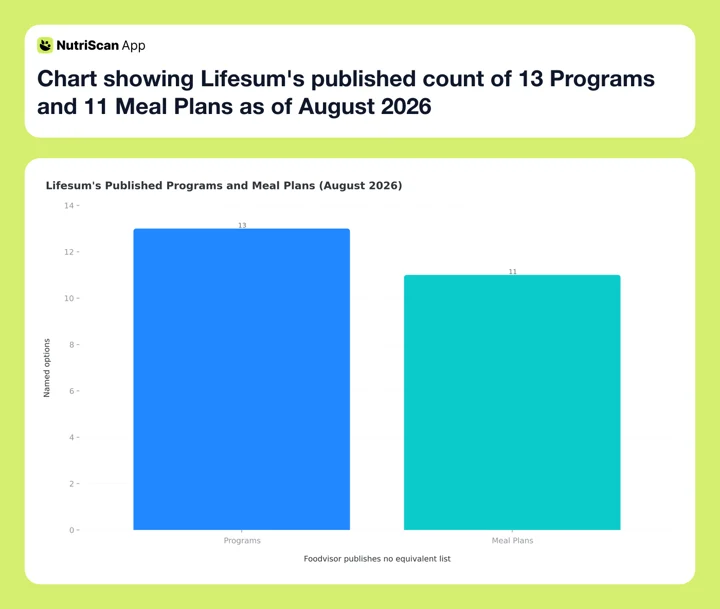 Figure 1: Lifesum names 13 Programs and 11 Meal Plans in its own help center, 24 options in total. Foodvisor publishes no equivalent list, so the two cannot be counted against each other.
Pricing and Free Tiers 💰
Foodvisor refuses to publish a price: "This is why we cannot provide a fixed universal price." The US App Store listing carries ten concurrent Premium SKUs, $23.99 up to $89.99, with monthly options at $14.99, $29.99 and $39.99. Its two annual tiers work out at $2.00 a month ($23.99 a year) and $7.00 a month ($83.99 a year).
Lifesum runs the same way. Its App Store listing carries $119.99 and $99.99 annual tiers while displaying a $49.99 annual offer, a $14.99 three-month offer and a $7.49 monthly one, with full-price three-month tiers at $29.99 and $39.99. The honest annual answer is roughly $49.99 to $119.99, depending on the offer live when you subscribe.
Neither app is reliably cheaper. Foodvisor's annual floor sits lower, Lifesum's monthly sits lower, and both move with the promotion. We track every live tier for each app separately in the Foodvisor pricing guide and the Lifesum pricing guide.
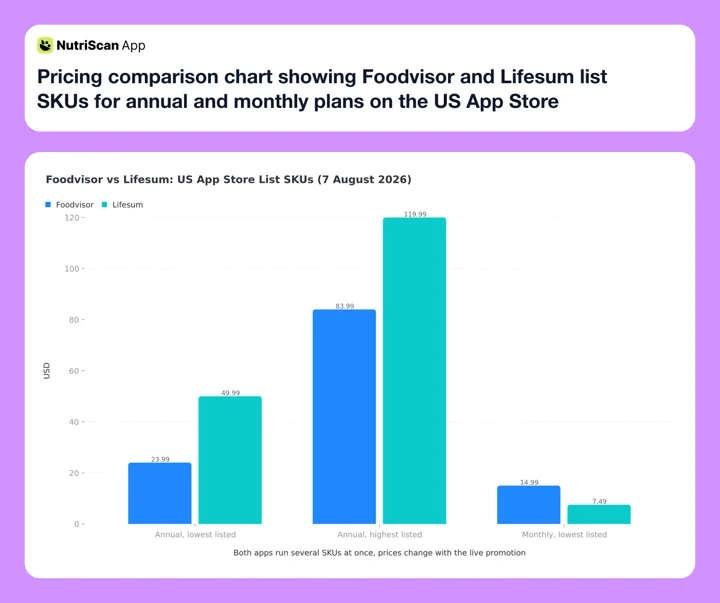 Figure 2: US App Store list SKUs, checked 7 August 2026. Foodvisor's annual Premium runs $23.99 to $83.99, cheapest monthly $14.99. Lifesum shows a $49.99 annual offer against a $119.99 list annual, and a $7.49 monthly.
On trials, Foodvisor publishes a 14-day free trial through its referral program, which then rolls into a 3-month subscription, and its listing carries two priced trial SKUs at $59.99 and $71.99. Lifesum marks a free trial on all three Premium tiers without publishing the length, and the discount routes it does publish are collected in our Lifesum free trial and deals breakdown. Both start through the app store, so whether a card is collected depends on your platform and region.
Refunds: The 14-Day Window Both Apps Run 🔍
Both apps run their own 14-day refund window, and on both, canceling is not the same thing as asking for your money back.
Foodvisor's policy is explicit: "you need to request a refund within 14 days - no refund will be granted after that time period", and, on the same page, "Just canceling a subscription does not automatically result in a refund, it only avoids a renewal." Renewal charges are not eligible at all, so the window covers your first charge only.
Lifesum uses near-identical wording: "you need to request this within a 14 day period after the purchase", plus a 14-day right to withdraw from the contract counted from the day the confirmation email arrives.
Most people assume the app store is the only route and never write to the vendor at all. Set a reminder before your trial ends, and if you get billed anyway, email support the same week. Two weeks later there is no route left on either app.
DANGER
The 14-day refund clock starts at the charge date, not the day you spot the charge. Canceling stops the next renewal, it does not refund the payment you already made.
 Consistent meal prep habits are what make any tracking app worth the subscription
Recipes and Daily Reliability 🍽️
Recipe Libraries
Lifesum surfaces recipes under a single Recipe tab, filtered to whatever Program or Meal Plan you are on (help center). Pick Mediterranean and the Mediterranean recipes come up, out of what Lifesum calls thousands of recipes with smart filters. Shopping lists generate inside Meal Plans.
Foodvisor counts in hundreds, not thousands: "Hundreds of healthy recipes" on its own Premium page, narrowed further by your goal and your plan. Smaller than Lifesum's library, closer to what you are meant to eat this week.
Stability Issues Both Apps Share
Both apps have post-update stability problems that surface in user reviews. Foodvisor's photo recognition has been reported to misidentify mixed dishes, especially regional foods or composite plates. What reviewers on the App Store listing complain about most is the database and the barcode scanner: entries that read 0 calories, or a serving size that comes back as 100 grams.
Lifesum's AI tracker has been reported to break after updates, with features reverting. Paid users report logging failures, manual entries that do not save and barcode scans that do not land (App Store reviews, checked August 2026), and the pivot left fewer ways to correct an AI-generated entry.
INFO
Neither app guarantees a stable experience across every release. Foodvisor's issues affect AI recognition accuracy on edge cases. Lifesum's affect core logging UI when the AI pivot ships changes. Both are improving, but check recent App Store reviews before subscribing.

Lifesum vs Foodvisor: Who Should Choose Each App ✅
Choose Foodvisor If:
- You want dietitian access in the price. Of these two, Foodvisor is the only one that puts a registered dietitian inside a tracking app subscription.
- You want photo-first logging with the smallest correction friction inside a coaching context.
- You want a trial with a published length. Foodvisor's referral route publishes 14 days; Lifesum marks a trial without saying how long it runs.
- You want a Family Plan. One organizer shares Premium with up to five more members through Apple Family Sharing, each on their own account.
- You are comfortable paying somewhere between $24 and $84 a year, depending on which offer you land on.
Choose Lifesum If:
- You want program variety. 22+ plan options including Climatarian, Hormonal Balance, Ketogenic Easy, Medium and Strict, and Mediterranean.
- You want a Life Score. The 0 to 150 weekly score simplifies feedback without a human coach.
- You want the option to switch AI logging off. Classic Food Tracking still runs alongside it.
- You prefer self-serve over coaching and trust yourself to follow a plan.
- You are willing to pay roughly $50 to $120 a year for the program library, depending on the offer live when you subscribe.
Where NutriScan Fits 📱
If both apps look like a compromise - Foodvisor's coaching with no published cadence and AI that struggles on mixed dishes, Lifesum's broader programs but fewer ways to correct an AI entry since the pivot - there is a third option built on a different philosophy.
NutriScan focuses on photo-first logging for real meals, including mixed dishes and regional foods that AI loggers often miss. Instead of choosing between coaching gating and self-serve sprawl, NutriScan lets you snap a photo, edit portions, and log in under 10 seconds, with prompts for portion, cooking method and oil level before the estimate lands on your day total.
NutriScan covers full photo logging, macro targets, and "what to eat next" suggestions. If you want the one-on-one versions, we have already run NutriScan vs Foodvisor and NutriScan vs Lifesum, plus a wider look at what an AI food tracker is meant to do.

NutriScan Home - daily macro breakdown with protein, carbs, fat and calorie tracking at a glance
Frequently Asked Questions ❓
Is Foodvisor or Lifesum cheaper?
Neither app has one price. Foodvisor's US App Store listing carries ten concurrent Premium SKUs, $23.99 up to $89.99, monthly from $14.99. Lifesum's annual Premium runs roughly $49.99 to $119.99 with a $7.49 monthly on display. Foodvisor's annual floor is lower, Lifesum's monthly is lower, and both move with the offer.
Which app has dietitian coaching?
Foodvisor includes registered dietitian access inside Premium (the Coach plan) and sells it as "Coaching by our dietitians". Lifesum has none at any tier. Its store subtitle says "Nutrition Coach", but the coach is the app. If dietitian access is the priority, Foodvisor is the only option of the two.
Which app has more diet plans?
Lifesum has 22+ Programs and Meal Plans across Lose, Maintain, and Gain Weight goals, 24 named in its own list as of August 2026. Foodvisor publishes no program list; it builds one plan from your onboarding questionnaire. Lifesum has more variety; Foodvisor has tighter coaching alignment.
Which app has better AI photo logging?
Neither publishes an accuracy figure, and both take the same four inputs: photo, voice, text and barcode. Research on AI dietary assessment reports nutrient estimation errors of 10% to 15% across 25 studies of research models (Zheng et al., 2024), a category-level number rather than a measurement of either app.
How long is the free trial?
Foodvisor publishes a 14-day free trial through its referral program, which then rolls into a 3-month subscription. Lifesum marks a free trial on all three Premium tiers without publishing the length. Both start through the app store, so whether a card is collected depends on your platform and region.
Does either app have a Family Plan?
Foodvisor supports a Family Plan through Apple Family Sharing: one organizer shares Premium with up to five more members, each on their own account. Lifesum says its in-app purchases are not eligible for Family Sharing, so every user needs a separate subscription.
Can I use both apps for free without paying?
Yes, but less than you would guess. Foodvisor's free tier is manual food-diary logging only; photo analysis sits entirely behind Premium. Lifesum's free tier covers basic logging on the Lifesum Standard program, and AI Tracking is itself Premium, along with every other Program and Meal Plan, adjustable goals, detailed nutrients and the recipe library.
How do refunds work on Foodvisor and Lifesum?
Both publish a 14-day refund window from the purchase date on their own help centers (Foodvisor, Lifesum), not through the store alone. Both warn that canceling only stops the next renewal, and Foodvisor states renewal charges are not eligible at all.
Is the Foodvisor dietitian always available?
Foodvisor publishes no response time and no check-in schedule for its dietitian coaching, so treat it as advice inside the app rather than an on-call relationship. If you need real-time coaching, this is a starter version rather than one-on-one practice.
Foodvisor eller Lifesum: which one should Swedish readers pick?
Eller is Swedish for or, and the phrasing turns up often because Lifesum is built in Stockholm. The answer does not change with the language. Lifesum gives you the Swedish-authored program shelf, Scandinavian and Climatarian among them, plus the Life Score. Foodvisor gives you a registered dietitian inside Premium. App Store prices are set per region, so read the Swedish listing rather than the US dollar figures above.
Should I switch between Foodvisor and Lifesum mid-streak?
Switching mid-streak resets your history in the new app since neither imports from the other. Give the current app two more weeks before switching, or trial the free tier of the other for a week before committing. If you would rather look wider than these two, start with the best Foodvisor alternatives or the best Lifesum alternatives.
Final Verdict 🏁
Foodvisor is the coaching app with photo logging built around dietitian access. Lifesum is the self-serve tracker with broader program variety. Both take the same four AI inputs, both have post-update stability complaints in their store reviews, and neither publishes an accuracy figure for its photo recognition.
For users who want a person checking the work, even occasionally, and prefer photo-first logging tied to a questionnaire-led plan, Foodvisor is the more honest fit. For users who want broad program shelves to experiment with and trust themselves to steer the plan, Lifesum delivers more variety, at a price that depends on the offer you catch.
If neither feels right, the 7-day NutriScan trial gives you a third reference point. It starts through your app store, so whether a card is collected depends on your platform and region. You can also check your personal macro targets with our free macro calculator before choosing any app.